
Immax neo LITE 07534L Smart Thermostat for Underfloor Heating User Manual
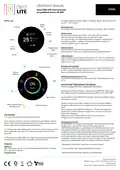




USER MANUAL
07534L
Immax NEO LITE Smart thermostat
for underfloor heating 3A, WiFi
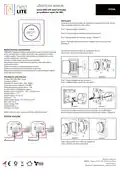
Temperature setting
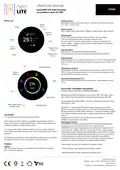
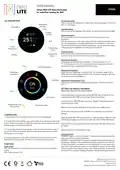
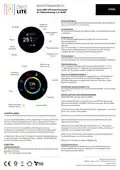
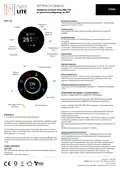
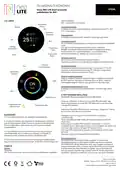
LCD DESCRIPTION
Here you can set the desired room temperature. The setting range is from 5°C to
45°C, in 0.5°C steps.
Temperature
The date
The weather
Language setting
Time
Here you can set the language of the device. You can choose German or English.
Outdoor
Humidity
2024/11/06
Mon. 10:02
Temperature sensor
IN: for temperature control, data is taken from the internal sensor in the
thermostat
OUT: for temperature control, data is taken from the external temperature sensor
ALL: the internal sensor in the thermostat detects the temperature in the room.
The external sensor measures the floor temperature - you set its maximum value
in the application. If exceeded, the heating will be turned off.
60%
c
Week
5
25
W
i
-
F
i
1
Current
Temperature
Programming
Cycle
Thermostat mode
Manual mode: direct setting of the desired temperature
Automatic mode: the thermostat follows a preset weekly schedule
Programming
Mode
Heating
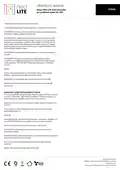
Temperature calibration
Temperature sensor temperature calibration. The compensation is -9°C to
9°C and the default value is 0°C. Set the compensation temperature after the
thermostat has been operating for at least 30 minutes.
Force
Set the temperature
Adjust screen brightness
Adjust the screen brightness in standby mode. The adjustment range is 0% to
100%. When the screen brightness is set to 0%, the screen backlight is off. Press
the button and the screen lights up.
Temperature
Calibration
Language
Temperature display setting (℉/℃)
Here you can set the scale for displaying temperatures - Fahrenheit or Celsius
(℉/℃)
ON
Power
SETTING THE WEEKLY PROGRAM
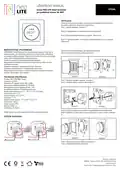
IMMAX NEO PRO APP AND DEVICE PAIRING
them
Scan the QR code and download the Immax NEO PRO app. Or search for and
install the Immax NEO PRO app in the App Store or Google Play.
Sensor type
Launch the Immax NEO PRO app and click on “Register” and create your own
account using your email.
Programming mode
Manual mode
Temperature scale
Make sure you have WiFi and Bluetooth turned on on your mobile phone.
Put the device into pairing mode. The WiFi icon on the device’s LCD will start
flashing.
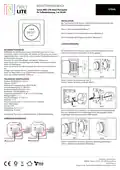
CONTROLLING
1. After turning on the thermostat, the home screen will be displayed.
Open the Immax NEO PRO app and click on + (Add new device). Wait a moment
until the device appears on the menu by itself, then click on Other WiFi devices.
2. To enter the function interface, you need to wake up the device by pressing the
button. Then turn the button to select the function you want to change, and press
the button again to confirm the selection.
Enter the WiFi name and password for the WiFi network. The WiFi network must
be 2.4GHz.
3. In the function interface, long press the button to return to the home screen. If
you do not confirm the selection, the thermostat will automatically return to the
home screen in 10 seconds.
Wait for the device to be added to the app.
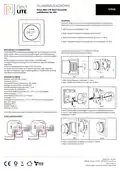
Safety information
WARNING: Keep out of reach of children. This product contains small parts that
may cause choking or injury if swallowed.
4. Long press the button (more than 5 seconds) on the home screen to put the
thermostat into pairing mode. The WiFi icon on the LCD will start flashing.
WARNING: Each battery has the potential to release harmful chemicals that can
damage skin, clothing, or the area where the battery is stored. To avoid the risk
of injury, do not allow any substance from the battery to come into contact with
eyes or skin. Each battery can rupture or even explode if exposed to fire or other
forms of excessive heat. Exercise caution when handling batteries. To reduce the
risk of injury from improper handling of batteries, take the following precautions:
FUNCTION
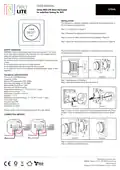
Power supply
ON – the thermostat is on and will control the valves according to the selected
setting
OFF – the thermostat is off
Manufacturer and importer:
IMMAX, Teslova 1179/2, 702 00 Ostrava-Prívoz
Designed in the Czech Republic, made in China

| General | Details |
|---|---|
| Name | Immax neo LITE 07534L Smart Thermostat for Underfloor Heating User Manual |
| Make | immax |
| Language | English |
| Filetype | PDF (Download) |
| File size | 0.74 MB |
 (1 votes, average: 5.00 out of 5)
 Loading...


Beca BHP-8000 C Room Thermostat User Guide

Honeywell RTH7500D Programmable Thermostat Owner’s Manual

GENERAL 300S Wired Room Thermostat User Manual

Honeywell TH8000 VisionPro WiFi Thermostat Instruction Manual

NT NetX X-Series Thermostat Installation Guide

MI-HEAT WT8 WiFi Smart Thermostat User Manual

Danfoss RT 115 Thermostat Installation Guide

BEOK BOT-T9N-WIFI Desktop Type RF Smart Thermostat for Wall-Hung Boiler User Manual
ENGO CONTROLS E901RF Wireless Programmable Thermostat User Guide

Danfoss TPOne-RF Electronic Programmable Room Thermostat Installation Guide