
HYSEN HY02DB-WIFI Wifi Plug In Thermostat User Manual
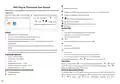


programming
selection
choose:hour,minute,temperature, press
return.
or
to adjust value. After finishing,press
to
Run ventilation mode
1:【
】close ventilation mode(press
A7 setting(open
to increase temperature and open this mode)
window)
2:10-20°C
Wake up
Out door
Back home
Out door
Back home
Sleep
Working time of
ventilation mode
Backlight brightness
when sleep
5-40minutes
20
1
A8
A9
6:00
8:00
11:30
13:30
17:00
22:00
20°C
15°C
15°C
15°C
15°C
15°C
1:0-8(0 close,1 Darkest,8 brightest )
The optimum comfort temperature is 18°C-22°C
Holiday mode setting
AA Reset factory setting
Display A o, press
until show all icons
On turn on state,long press
3-5 seconds to enter setting interface,press
to enter holiday mode setting,then press to choose:days and temperature, press
to adjust value. After finishing,press to return.
or
to choose
Wiring and installation instructions
1. Read these instructions carefully. Failure to follow these instructions can result in damage to
3,press
or
the product or a hazardous situation.
2. Confirm the maximum load given in the instructions and product, to ensure the product is right
for your application.
Advanced options
On turn off state,long press
3-5 seconds to enter advanced options, short press
to choose
3. The installer must be a trained and experienced service technician.
4. After the installation completed, follow the steps in these instructions.
the option, press
or
to adjust value.After setting finished,keep about 10 seconds will
automatic save and exit.
NO
Setting Options
Data Setting Function
Factory Default
Warning
Measuring
-9-+9°C
-1℃
Live work can cause a short circuit or damage the device
A1 Temperature
Calibration
Disconnect power supply before installation
Start/stop working
A2 temperature
difference setting
0.5-2.5°C
1. 1-10°C
1°C
5°C
Low temperature
protection setting
A3
2. Exceed 10°C, screen display【--】, low
temperature protection was canceled.
1-10°C
Setting temperature
minimum limit
5°C
A4
A5
Setting temperature
maximum limit
20-70°C
35°C
A6 Run weekly
0:(5+2)/1:(6+1)/2:(7days)
0:(5+2)

| General | Details |
|---|---|
| Name | HYSEN HY02DB-WIFI Wifi Plug In Thermostat User Manual |
| Make | HYSEN |
| Language | English |
| Filetype | PDF (Download) |
| File size | 0.1 MB |
 (1 votes, average: 5.00 out of 5)
 Loading...

HYSEN HY518WE WIFI Digital Heating Thermostat User Manual

HYSEN HY312 Wi-Fi Digital Heating Thermostat Instruction Manual

HYSEN HY510 WiFi Heating Thermostat Instruction Manual

HYSEN HY511 WiFi Heating Thermostat Owner’s Manual

HYSEN HY608 Wi-Fi Digital Heating Thermostat User Manual

HYSEN HY02B05RF Wireless Heating Thermostat User Manual

HYSEN HY09RF WI-FI Wireless Thermostat User Manual


Hotwire HWTH Horizontal Thermostat Instructions

BACKER ELECTRIC BMST 7 Backermatic Safety Thermostat Instructions

GE Programmable CYNC Smart Thermostat User Guide

Spacio Innovations Inc 13EA2A7RI Remote Thermostat User Manual

Beca BAC-008 Series WiFi Thermostat User Guide

terneo bx Smart Thermostat Instruction Manual

autani SMT-131 Wireless Digital Thermostat Installation Guide

HELTUN Fan Coil Thermostat HE-FT01 User Manual

emos P5606OT Programmable Electronic Indoor Thermostat User Manual

TECH EU-295 Underfloor Heating Room Thermostat User Manual