
Honeywell RTH2510/RTH2410 Thermostat Installation Guide








Quick Installation Guide
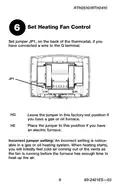
Set Heat Pump Reversing Valve
7
Set jumper JP2, on the back of the thermostat, if you
have a heat pump.
JP2
O
B
Leave the jumper in this factory-set position if
you have connected O wire to the O/B terminal.
Place the jumper to this position if you have
connected B wire to the O/B terminal.
Incorrect jumper setting: The heat pump operation will
be reversed, i.e., it will cool in Heat mode and will heat in
Cool mode.
69-2421ES—03
10

| General | Details |
|---|---|
| Name | Honeywell RTH2510/RTH2410 Thermostat Installation Guide |
| Make | Honeywell |
| Language | English |
| Filetype | PDF (Download) |
| File size | 0.61 MB |
 (1 votes, average: 5.00 out of 5)
 Loading...

Honeywell T6 Pro Programmable Thermostat User Manual

Honeywell D1-528 Direct Thermostat Installation Guide

Honeywell FocusPRO P200 Programmable Thermostat User Guide

Honeywell RCHT8610WF Series Smart Thermostat Installation Guide

Honeywell T9 Smart Thermostat Installation Guide

Honeywell TH2320WF4011 FocusPRO Smart S200 Series Thermostat User Guide

Honeywell TL116A Thermostat Installation Guide

T10 Pro Smart Thermostat with Redlink Room Sensor

Honeywell TH6320WF2003 Lyric T6 Pro Wi-Fi Programmable Thermostat User Guide

Honeywell RTH9580 Wi-Fi Color Touchscreen Programmable Thermostat User Guide


Honeywell T3 Programmable Thermostat User Guide

ROMA HEATING CT1000 WiFi Colour Touch Screen Thermostat User Manual

Danfoss RMT-230 Room Thermostat Installation Guide

emos P5616OT Wireless Thermostat Instruction Manual

Smart Temp SMT-450 Flexistat WiFi Thermostat Instructions

SALUS Programmable Wired Thermostat VS30W/VS30B Installation Guide

BEOK CONTROLS TDR83 WiFi Heating Thermostat User Guide

GENERAL ARUNA 300S RF Digital Room Thermostat User Manual

Goodman GTST Connected Thermostat User Guide

Meross MTS200HK Smart Thermostat User Manual