
Home > GE Appliances > GE APPLIANCES RAK150VF2 Digital Wall Thermostat Instruction Manual
GE APPLIANCES RAK150VF2 Digital Wall Thermostat Instruction Manual














FONCTIONS D’UTILISATION
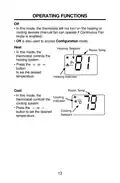
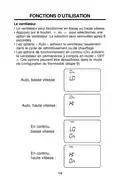
Le ventilateur
• Le ventilateur peut fonctionner en basse ou haute vitesse.
• Appuyez sur le bouton ou pour sélectionner une
option de ventilateur. La sélection sera verrouillée après 8
secondes.
• Les options « Auto » activent le ventilateur seulement
dans le cycle de refroidissement ou de chauffage.
• Les options de fonctionnement en continu (On) activent
le ventilateur en permanence y compris en mode « OFF
». Ces options peuvent être désactivées dans le mode
de configuration du thermostat (étape 9).
FAN
AUTO
Auto, basse vitesse :
FAN
AUTO
Auto, haute vitesse :
FAN
En continu,
basse vitesse :
FAN
En continu,
haute vitesse :
14

| General | Details |
|---|---|
| Name | GE APPLIANCES RAK150VF2 Digital Wall Thermostat Instruction Manual |
| Make | GE Appliances |
| Language | English |
| Filetype | PDF (Download) |
| File size | 0.22 MB |
 (1 votes, average: 5.00 out of 5)
 Loading...

GE APPLIANCES RAK160W2 Wireless Thermostat User Manual

GE APPLIANCES RAK190V Energy Management Thermostat Owner’s Manual

GE APPLIANCES RAK190V 2 Way Energy Management Thermostat Instruction Manual

GE APPLIANCES THERMOSTAT Owner’s Manual


ESi ESRTP4RFW RF Programmable Room Thermostat User Manual

tado Smart Thermostat V3+ User Guide

BOSCH 6721807275 Smart Radiator Thermostat Installation Guide

WHITE-RODGERS 1F75H-21PR Programmable Thermostat Owner’s Manual

tuya BHT-005 Wifi Heating Thermostat User Manual

GENERAL LIFE MITRA 260S RF Digital Room Thermostat User Manual

Meross MTS960 Smart Wi-Fi Socket Thermostat Instruction Manual

SALUS TS600 Remote-Only Thermostat User Guide

VIVE TP-S-955WH Programmable Thermostat Instruction Manual

HEATIT Z-TRM6 Matt Z-Wave Thermostat User Guide