
Dimplex X3D Wireless Programmable Thermostat Instruction Manual






4. Configuration
1
2
4
-5°C -> +5°C
>5s
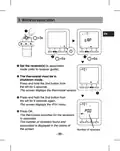
The thermostat must be in shutdown mode.
3
Ê Press and hold the 2nd button from the left for 5 seconds.
The screen displays the thermostat version.
Ë Press OK.
The screen displays the CF01 menu.
Ì Choose your selection or setting with + and -.
Press OK to validate and go to the next setting.
To exit the mode, turn the selector knob
Note: the greyed out sections of the tables match the default
values
CF01 - Correcting the temperature measured
Can be set from -5°C to +5°C.
Example: the temperature displayed by the unit is 19°C and the
actual temperature (thermometer) is 20°C, set +1°C.
CF02 - Temperature displayed in AUTO mode
Temperature setting
0
1
Temperature measured
- 34 -

| General | Details |
|---|---|
| Name | Dimplex X3D Wireless Programmable Thermostat Instruction Manual |
| Make | Dimplex |
| Language | English |
| Filetype | PDF (Download) |
| File size | 1.65 MB |
 (1 votes, average: 5.00 out of 5)
 Loading...

DIMPLEX ML2TA 2KW Convector Heater With Thermostat Instruction Manual

Dimplex DWT431W Non-Programmable Thermostat 4000W Owner’s Manual


TX1000 Thermostat Instruction Manual

DELTA 8000 Heating Thermostat Instructions

GENERALLIFE MITRA 260S RF Wireless Room Thermostat User Manual

Beca BAC-006 Zigbee Thermostat User Guide

ENGO CONTROLS EFAN-24W Fan Coil Thermostat User Guide

vaillant VR 92f/3 Wireless Additional Room Thermostat Instructions

Vine TJ-560 Smart Thermostat User Manual

GENERAL LIFE FH251S Underfloor Heating Thermostat User Manual

AIRZONE AZX6AIQSNSB-AZX6AC1VALR Think Wireless Monochrome Thermostat User Manual

GTS TR8100V WiFi Pairing Thermostat Instruction Manual