
Home > COLDBUSTER > COLDBUSTER CB Dual Thermostat User Manual
COLDBUSTER CB Dual Thermostat User Manual


CB MANUAL
User Manual
Coldbuster Floor Heating
8/81 Frenchs Forest Road E
Frenchs Forest NSW 2086
Phone: +61 2 9982 5374 / Toll Free: 1800 85 75 65
Website: www.Coldbuster.com.au


| General | Details |
|---|---|
| Name | COLDBUSTER CB Dual Thermostat User Manual |
| Make | COLDBUSTER |
| Language | English |
| Filetype | PDF (Download) |
| File size | 0.2 MB |
 (1 votes, average: 5.00 out of 5)
 Loading...

COLDBUSTER MWD5 Programmable Thermostat User Manual

RTH21 Programmable Thermostat Coldbuster Dual Instruction Manual

COLDBUSTER MCD5 Programmable Thermostat User Manual
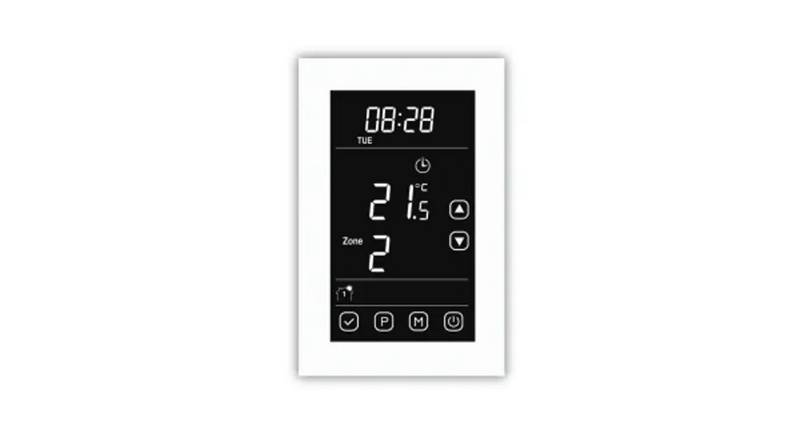
COLDBUSTER CB Dual Thermostat User Manual Overview
Summary of Contents
- Page 1: User manual Coldbuster floor heating
- Page 2: The CB Manual thermostat controls a floor heating system based on a built-in weekly program. You can set individual temperatures for events on different days of the week. Lowering the temperature when the home is unoccupied will reduce energy costs without reducing comfort. The thermostat features an adaptive function that automatically changes heating period start times. Supply voltage: 85-265 VAC 50/60 Hz. Max.16 A (resistive load). Standby power loss: <1W. Loosen the bottom screw with a Phillips screwdriver to open the thermostat. Connect the power cord using the terminal block. Disconnect the main power supply before wiring. Install the back cover into the terminal box and secure it with the set screw.
- Page 3: On/Off button allows you to turn the device on or off. Temporary override temperature is a setting in auto mode that does not affect the schedule. To set the override temperature, use the ▲ or ▼ buttons and confirm with the OK button. Three modes are available: auto mode, manual mode, and anti-frozen mode. In auto mode, the thermostat follows the weekly program parameters. Manual mode allows for temperature selection by the user. Anti-frozen mode maintains a lower temperature range from 5°C to 15°C for unoccupied homes. To select a mode, press OK to activate the menu and use the ▲ or ▼ buttons to choose. Key lock prevents changes to thermostat settings, but can be overridden in emergencies. To lock or unlock the thermostat, follow the specific button presses as outlined in the instructions.
- Page 4: Weekly program parameter setting In auto mode, the thermostat runs automatically according to the setting parameters of the weekly program. The weekly program parameters contain two major parameters: Schedule and Event. Schedule: Two schedules for a week. 5+1+1: The Event parameter is the same from Monday to Friday, with separate Event parameters on Saturday and Sunday. 7: Separate Event parameters every day. Event: Home includes settings for morning, away at work, coming home, and at night. Event: Office includes settings for being at the office and getting off work. Temperature in each event can be set. Press OK button to enter event settings. Press OK button to set the temperature for this phase.
- Page 5: Settings This thermostat can be used for different applications with various settings. It should be set by professional technicians to avoid damage from abnormal settings. Time setting involves setting the date and week, which updates when connected to Wi-Fi. Temperature unit can be changed between °C and °F. The thermostat can connect to multiple types of floor sensors without needing to replace the existing sensor. Sensor type settings allow selection between different sensor types. Pressing the OK button confirms settings throughout the process. Use the ▲ or ▼ buttons to navigate through settings. Returning to the active display requires pressing the OK button multiple times.
- Page 6: Sensor selection includes three applications: Room, Floor, and Room.Limit. Room application controls temperature based on built-in sensors. Floor application controls temperature based on the floor sensor. Room.Limit application monitors floor temperature not to exceed an upper limit. Calibration function allows for higher precision using built-in probe and floor sensor. Calibration settings enable adjustment of real-time temperature to match displayed values. The thermostat is suitable for both homes and offices, with built-in weekly program parameters for offices. Adaptive function automatically adjusts heating period start times for required temperature. Settings can be accessed using the ▲ or ▼ buttons and confirmed with the OK button. Users can return to the active display by pressing the OK button.
- Page 7: Readout This thermostat can read the amount of time (in percent) that the heating has been turned on within a certain period. Press OK button to get. Press OK button to come back to setting interface. Factory Reset Factory Reset setting: Press OK button to confirm. Press OK button to come back to Active display interface. Troubleshooting E1: Built-in probe failure, please contact your dealer or professional technician. E2: External probe failure, please contact your dealer or professional technician.

Futurehome Co020, Co021 Smart Thermostat PR Owner’s Manual

STELPRO STE302NP Single Programming Electronic Thermostat User Guide

SALUS HTRS-RF30 Wireless Digital Thermostat Installation Guide

LUX TX9600TSA Smart Temp Universal 7 Day Programmable Touchscreen Thermostat Instruction Manual

BEOK CONTROLS TDS72 Digital Screen Thermostat Instruction Manual

Danfoss BD271136569160en-010102 Electronic Radiator Thermostat Owner’s Manual

sygonix SY-5470190 Wireless Indoor Thermostat Instruction Manual

Honeywell T827 Series Programmable Thermostat Owner’s Manual

COOKING PERFORMANCE GROUP 351030208 Retrofit Thermostat Instructions

PECO T8168 Performance Pro Thermostat Installation Guide