×
- 1. Smart Temperature Controller Series (Stc-1000pro User Manual → Smart Digital Thermostat)
- 2. Smart Temperature Controller Series (Stc-1000pro User Manual → Intelligente Temperaturregler-serie → Stc-1000pro Benutzerhandbuch → Serie Del Controlador De Temperatura Inteligente → Manual De Uso De Stc-1000pro → Série De Thermostat Intelligent)
- 3. Overview (In The Box → Temperature Probe → Main Controller → Power Plug → Cooling And Heating Outlets)
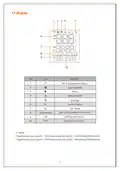
- 4. Display (Wi-fi Connection Status → Cooling Mode → Heating Mode → Settings → Parameters)
- 5. Operation (Probe Installation → Power On)
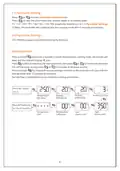
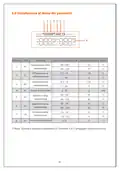
- 6. Parameter Viewing (Parameter Settings)
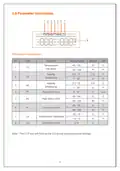
- 7. Parameter Instructions (Temperature Set-point → Cooling → Differential → Heating → High Alarm Limit → Low Alarm Limit → Temperature Calibration)
- 8. Parameter Functions (Temperature Setting - Ts, Hd, Cd, Pv, Sv → Cooling Mode → Heating Mode → Protection Time - Pt)
- 9. Protection Time - Pt (cooling Mode Only) (High Alarm Limit - Ah → Low Alarm Limit - Al → Temperature Calibration - Ca → Celsius/fahrenheit - Cf)
- 10. Installation (Cooling/heating)
- 11. Error Code (Reset → Specifications)
- 12. Übersicht (Sensor → Hauptregler → Netzstecker → Kälte-/heizungss- Steckdose)
- 13. Bildschirmeinführung (Wi-fi-verbindungsstatus → Warnstatus → Kühlmodus → Heizmodus → Einstellungsmodus → Aktuelle Temperatur)
- 14. Betrieb (Sensorinstallation → Einschalten)
- 15. Parameteranzeige (Parametereinstellungen → Tastenbedienung)
- 16. Einführung In Das Parametermenü (Einstelltemperatur → Kühlungsdifferenz → Heizungsdifferenz → Schutzzeit → Hochtemperaturalarm → Niedrigtemperaturalarm)
- 17. Einführung Der Parameterfunktion (Einstelltemperatur - Ts, Hd, Cd & Pv, Sv → Kühlmodus Aktivieren → Heizmodus Aktivieren)
- 18. Schutzzeit - Pt (Hochtemperaturalarm-ah → Niedrigtemperaturalarm-al → Temperaturkorrektur Ca → Fahrenheit Oder Celsius-cf)
- 19. Geräteinstallation (Kühl-/heizsteckdose)
- 20. Fehlercode (Alle Einstellungen Wiederherstellen → Technische Parameter)
- 21. Introducción (Vista General → Sonda → Controlador Principal → Enchufe De Alimentación → Enchufe Múltiple De Refrigeración/calentamiento)
- 22. Introducción De Pantalla (Estado De Conexión De Wi-fi → Modo De Refrigeración → Estado De Alarma → Modo De Calentamiento → Modo De Configuración → Parámetros)
- 23. Operación (Instalación Del Sonda → Inicio)
- 24. Consultar Parámetros (Configuración De Parámetros → Operación Por Botón)
- 25. Introducción Del Menú De Parámetros (Función → Alcance De Configuración → Valor Por Defecto → Unidad → Alarma De Alta Temperatura → Alarma De Baja Temperatura)
- 26. Introducción De Funciones De Parámetros (Temperatura Configurada → Entrada En El Modo De Refrigeración → Entrada En El Modo De Calentamiento)
- 27. Tiempo De Protección Pt (Alarma De Alta Temperatura Ah → Alarma De Baja Temperatura Al → Calibración De Temperatura Ca → Grado Fahrenheit O Centígrado Cf)
- 28. Geräteinstallation (Tomacorriente De Refrigeración / Calentamiento → Cuidado Con La Seguridad Eléctrica)
- 29. Código De Alarma (Función De Restauración → Parámetros Técnicos)
- 30. Présentation (Vue Densemble → Capteur → Thermostat Principal → Prise Mâle → Bande De Puissance)
- 31. Présentation De Lécran (État De Connexion Wi-fi → Mode De Refroidissement → Mode De Chauffage → Température Actuelle → Température Définie → Paramètres)
- 32. Opération (Installation De Capteur → Démarrage)
- 33. Consultation Des Paramètres (Configuration Des Paramètres → Opération De Boutons)
- 34. Présentation Du Menu De Paramètres (Plage De Configuration → Température Définie → Différence De Retour De Refroidissement → Différence De Retour De Chauffage → Alarme De Haute Température → Alarme De Basse Température)
- 35. Présentation Des Fonctions De Paramètre (Définition De Température - Ts, Hd, Cd & Pv, Sv → Temps De Protection - Pt → Mode De Refroidissement → Mode De Chauffage)
- 36. Temps De Protection - Pt (Alarme De Haute Température - Ah → Alarme De Basse Température - Al → Correction De Température - Ca → Degrés Fahrenheit Ou Celsius - Cf)
- 37. Installation Dappareil (Prise Femelle De Refroidissement/chauffage)
- 38. Codes De Panne (Fonction De Restauration → Paramètres Techniques)
- 39. Introduzione (Panoramica → Sensore → Pannello Di Controllo Principale → Spina Di Alimentazione → Prese Di Raffreddamento E Riscaldamento)
- 40. Lo Schermo (Stato Di Connessione Wi-fi → Modalità Di Raffreddamento → Stato Di Allarme → Modalità Di Riscaldamento → Impostazione Delle Modalità → Temperatura Corrente)
- 41. Operazione (Installazione Del Sensore → Accensione)
- 42. Visualizzazione Dei Parametri (Impostazione Dei Parametri → Operazione Dei Pulsanti → Diagramma Di Flusso Di Configurazione Dei Parametri)
- 43. Introduzione Al Menu Dei Parametri (Funzione → Impostazione Della Temperatura → Differenziale Di Raffreddamento → Differenziale Di Riscaldamento → Tempo Di Protezione → Allarme Di Alta Temperatura → Allarme Di Bassa Temperatura)
- 44. Introduzione Alle Funzioni Dei Parametri (Impostazione Della Temperatura - Ts, Hd, Cd & Pv, Sv → Attivazione Di Modalità Di Raffreddamento → Attivazione Di Modalità Di Riscaldamento)
- 45. Tempo Di Protezione - Pt (Allarme Di Alta Temperatura - Ah → Allarme Di Bassa Temperatura - Al → Correzione Della Temperatura - Ca → Fahrenheit O Celsius - Cf)
- 46. Installazione Del Termostato (Presa Raffreddamento/riscaldamento → Sicurezza Elettrica)
- 47. Codici Di Errore (Funzione Di Ripristino → Parametri Tecnici)
- 48. Xuzhou Yunkewulianwang Co., Ltd.
×
Xetron STC-1000Pro Smart Digital Thermostat User Manual
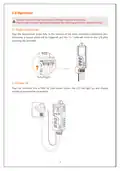
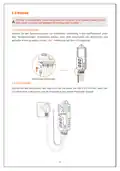
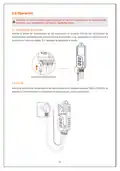
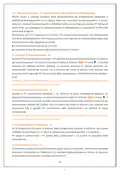
2.0 Operación
Atención: El uso incorrecto puede provocar las lesiones corporales y los deterioros del
producto. Lea, comprenda y ejecuta los siguientes pasos.
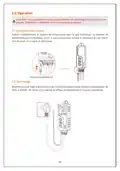
2.1 Instalación del sonda
Inserte el sonda de temperatura en los auriculares en la parte inferior del controlador de
temperatura completamente para realizar la instalación, si no, aparecerán la alarma visual y
acústica y el aviso de código 'Err' después de encender el sonda.
Inserte completamente
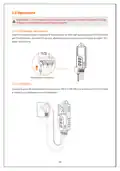
2.2 Inicio
Inserte el enchufe de alimentación del controlador en el tomacorriente de 100V a 250VCA, la
pantalla LCD se encenderá y visualizará la temperatura y otros parámetros.
21
| General | Details |
|---|---|
| Name | Xetron STC-1000Pro Smart Digital Thermostat User Manual |
| Make | Xetron |
| Language | English |
| Filetype | PDF (Download) |
| File size | 2.37 MB |


Centrometal TU-DT-2024-ENG Thermostat Instruction Manual

EMERSON ST765470 Digital Thermostat User Manual
BVF Heating L-1 Smart Outdoor Thermostat User Manual

Thalos Key 230 Bianco Touch Screen Wall Thermostat Instruction Manual
Honeywell Non-Programmable Digital Thermostat User Guide

Honeywell TL116A Thermostat Installation Guide

aube technologies TH108PLUS Electronic Thermostat User Guide

HEAT DECOR HD-T1000 WIFI Thermostat User Guide

Honeywell Home RLV3150 Electric Thermostat User Guide

Roth VVS-nr. 466397.058 Softline Standard Room Thermostat Instruction Manual
Table of Contents
- 1. Smart Temperature Controller Series - Stc-1000pro User Manua... →
- 2. Smart Temperature Controller Series - Stc-1000pro User Manua... →
- 3. Overview - In The Box →
- 4. Display - Wi-fi Connection Status →
- 5. Operation - Probe Installation →
- 6. Parameter Viewing - Parameter Settings →
- 7. Parameter Instructions - Temperature Set-point →
- 8. Parameter Functions - Temperature Setting - Ts, Hd, Cd, Pv, ... →
- 9. Protection Time - Pt (cooling Mode Only) - High Alarm Limit ... →
- 10. Installation - Cooling/heating →
- 11. Error Code - Reset →
- 12. Übersicht - Sensor →
- 13. Bildschirmeinführung - Wi-fi-verbindungssta... →
- 14. Betrieb - Sensorinstallation →
- 15. Parameteranzeige - Parametereinstellung... →
- 16. Einführung In Das Parametermenü - Einstelltemperatur →
- 17. Einführung Der Parameterfunktion - Einstelltemperatur - Ts, ... →
- 18. Schutzzeit - Pt - Hochtemperaturalarm-... →
- 19. Geräteinstallation - Kühl-/heizsteckdose →
- 20. Fehlercode - Alle Einstellungen Wiederherstellen →
- 21. Introducción - Vista General →
- 22. Introducción De Pantalla - Estado De Conexión De Wi-fi →
- 23. Operación - Instalación Del Sonda →
- 24. Consultar Parámetros - Configuración De Parámetros →
- 25. Introducción Del Menú De Parámetros - Función →
- 26. Introducción De Funciones De Parámetros - Temperatura Config... →
- 27. Tiempo De Protección Pt - Alarma De Alta Temperatura Ah →
- 28. Geräteinstallation - Tomacorriente De Refrigeración / Calent... →
- 29. Código De Alarma - Función De Restauración →
- 30. Présentation - Vue Densemble →
- 31. Présentation De Lécran - État De Connexion Wi-fi →
- 32. Opération - Installation De Capteur →
- 33. Consultation Des Paramètres - Configuration Des Paramètres →
- 34. Présentation Du Menu De Paramètres - Plage De Configuration →
- 35. Présentation Des Fonctions De Paramètre - Définition De Temp... →
- 36. Temps De Protection - Pt - Alarme De Haute Température - Ah →
- 37. Installation Dappareil - Prise Femelle De Refroidissement/ch... →
- 38. Codes De Panne - Fonction De Restauration →
- 39. Introduzione - Panoramica →
- 40. Lo Schermo - Stato Di Connessione Wi-fi →
- 41. Operazione - Installazione Del Sensore →
- 42. Visualizzazione Dei Parametri - Impostazione Dei Parametri →
- 43. Introduzione Al Menu Dei Parametri - Funzione →
- 44. Introduzione Alle Funzioni Dei Parametri - Impostazione Dell... →
- 45. Tempo Di Protezione - Pt - Allarme Di Alta Temperatura - Ah →
- 46. Installazione Del Termostato - Presa Raffreddamento/riscalda... →
- 47. Codici Di Errore - Funzione Di Ripristino →
- 48. Xuzhou Yunkewulianwang Co., Ltd. →