
terneo rzx Smart Thermostat User Manual


its status. If you block the remote control of the
thermostat, the «cloud» can only be used to accumulate
statistical data (see details in Table 1). For the statistics
and heating schedule to operate correctly, after
connecting to the «cloud», specify your time zone.
Further, the thermostat will independently update the date
and time online.
Technical data sheet
and installation and
operation manual
terneo
TECHNICAL DATA
INSTALLATION
Adjustment range
5...35 °С
16 А
The thermostat is designed for indoor installation. The risk
of moisture and liquid appearance on the installation site
should be minimal.
Maximum
load current
rzx
Rated load capacity
Input voltage
3 000 VА
230 V ±10 %
0,2 kg ±10 %
smart thermostat
To protect against short circuit and exceeding power in the
load circuit, it is necessary to install a circuit breaker (CB)
with a rate of not more than 16 A before the thermostat in
the phase wire break in the switchboard.
In the absence of the Internet, the thermostat will
continue its operation according to the latest settings. In
addition, you can control the thermostat via the
thermostat buttons or offline mode in the terneo app.
Please note that instead of landline connection modes,
you can use mobile data. To do this, you need a separate
device (for example, a smartphone) with a WLAN Hotspot
to share.
Weight in the complete set
Temperature sensor
NTC thermo-resistor
10K ОM at 25 °С (R10)
To prevent the oxidation of the socket contacts, which can
lead to damage of the device, the use of a thermostat
inside the greenhouse is prohibited.
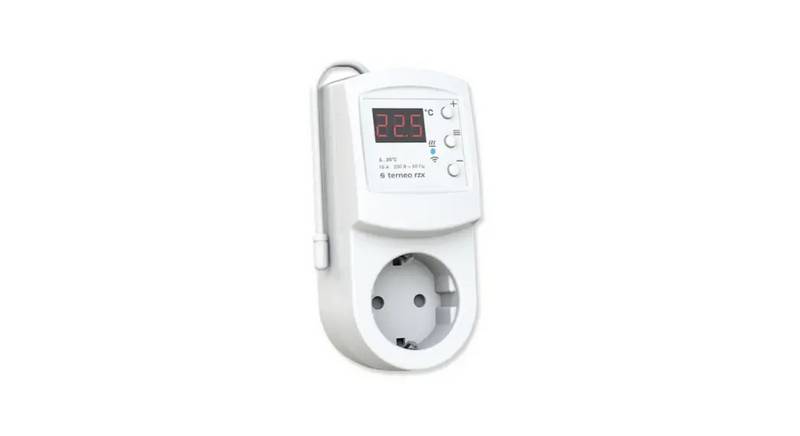
Smart thermostat terneo rzx is designed to control
heating systems based on infrared panels, electric
convectors and other electric heaters through
the terneo mobile application, my.terneo web page or
voice by using Yandex Alice.
The length of the sensor
connected cable
0,1 m
To protect a person from electric shock, an RCD (residual-
current device) is installed in the switchboard.
Number combinations
under heat, at least
5
0
0
0
0
c
y
c
l
e
s
When restoring the Wi-Fi connection of the thermostat
with the cloud, all settings are synchronized.
Number of combinations without
heating, no less than
Wires cross-section of the wiring to which the device is
connected must correspond to the value of the electric
current consumed by the load.
20 000 000 cycles
Scan to download the free terneo app
Not recommended to use in networks with Multi WAN
technology.
Temperature hysteresis
0,5...10 °С, step 0,1 °С
802.11 b/g/n
Wireless Networking Standard
If previously you connected the thermostat to
your Wi-Fi network or want to use these
settings, choose «Clı» Client mode (Таble 1).
Minimum recommended speed
of Internet connection
According to data from temperature sensor, the
thermostat turns off the heating when the desired tempe-
rature is reached and turns on when it decreases at the
hysteresis value.
128 kb / s
RESISTANCE OF EXTERNAL TEMPERATURE SENSOR
at different ambient temperatures
Operating frequency range
Minimal Internet traffic
Wi-Fi power output
2400-2483,5 МHz
20–30 MB / ms.
+20 dBm
5 °С
25339 Ω
19872 Ω
12488 Ω
8059 Ω
10 °С
20 °С
30 °С
40 °С
WARRANTY TERMS
Overall dimensions
58 х 124 х 87 mm
The warranty for terneo devices is valid for 36 months
from the date of sale, provided that the instructions are
followed. The warranty period for products without a
warranty certificate is counted from the date of
production.
Available languages on the app
ru, ua, en, rom, cs, pl, de
IN THE BOX
5330 Ω
Thermostat
1 piece
Technical data sheet and
installation and operation manual
and warranty card
WIRING
If your device is not working properly, we recommend that
you first read the section «Possible problems». If you
cannot find an answer, contact Service Center. In most
cases, these actions resolve all issues.
SMART REMOTE
CONTROL FEATURES
1 piece
1 piece
The terneo rzx thermostat is plugged into a standard
socket with grounding 230 V ~ 50 Hz, which should be
rated at a current of at least 16 A. The socket should
ensure reliable contact with the thermostat plug.
The packing box
WLAN control from a mobile app;
weekly schedule;
energy consumption graphs in kWh and monetary
terms;
Nobody is home and Preheat functions (self-learning);
single control over a group of thermostats;
granting access to other family members;
voice control via Google Assistant.
If you continue to have issues with the device, please
send it to a Service Center or to the store where you
purchased the device. If your device is defective due to
our fault, we will repair or replace it under warranty within
14 business days.
To enable the thermostat you should:
plug the thermostat into the socket;
plug the load to the socket of the thermostat.
Scan to see all the benefits of Smart
It is necessary for the thermostat to switch the current to no
more than 2/3 of the maximum current specified in the
passport.
thermostat terneo bx and download the
terneo app features brochure from the
web-page.
Please see the full text of the warranty and the data you
need to send to your Service Center on the website
have a warranty case, please, contact the General
distributor in your area.
Smart functions allow you to save up to 50% by
maintaining a comfortable floor temperature when you
need it only.
IMPORTANT. Before the installation and operation
of the device, please read by the end of this
document. This will help to avoid possible danger,
mistakes and misunderstandings.
View set temperature and
increasing parameter
SERVICE CENTER CONTACT:
terneo
+38 (091) 481-91-81
WhatsApp Viber Telegram
Мenu
IN CASE OF NO VOLTAGE, all thermostat and
heating schedule settings are kept in the non-volatile
thermostat storage, and the clock will continue to
operate fed from the internal power source for three
days.
CONNECTING TO THE «CLOUD»
FOR CONTROL FEATURES
View set temperature and
decreasing parameter
WARRANTY CARD
serial №:
date of sale:
If to say in brief, the «cloud» is intended for the safe
keeping of the data in the net Internet, comfortable and safe
long-distance connection and operation.
Voltage supply indicator on load
a seller, a seal:
Internet connection available the thermostat constantly
synchronizes with the cloud, performs its commands,
receives the latest settings and sends the telemetry about
place of a seal
Temperature sensor
2
an owner contact
for a service center:
1
3


| General | Details |
|---|---|
| Name | terneo rzx Smart Thermostat User Manual |
| Make | terneo |
| Language | English |
| Filetype | PDF (Download) |
| File size | 0.25 MB |
 (1 votes, average: 5.00 out of 5)
 Loading...
terneo v3G33 Simple Heat Control Thermostat Instruction Manual

terneo BeeRT Digital Thermostat Instruction Manual

terneo bx Smart Thermostat Instruction Manual
terneo rzx Smart Thermostat User Manual Overview
Summary of Contents
- Page 1: If you block the remote control of the thermostat, the cloud can only be used to accumulate statistical data. For the statistics and heating schedule to operate correctly, after connecting to the cloud, specify your time zone. The thermostat is designed for indoor installation. To protect against short circuit and exceeding power in the load circuit, it is necessary to install a circuit breaker with a rate of not more than 16 A. In the absence of the Internet, the thermostat will continue its operation according to the latest settings. Smart thermostat terneo rzx is designed to control heating systems based on infrared panels, electric convectors, and other electric heaters. The warranty for terneo devices is valid for 36 months from the date of sale, provided that the instructions are followed. WLAN control from a mobile app includes features like weekly schedule and energy consumption graphs. Before the installation and operation of the device, please read by the end of this document to avoid possible danger and misunderstandings. The cloud is intended for the safe keeping of data, comfortable and safe long-distance connection and operation.
- Page 2: Select the Wi-Fi network created by the thermostat and press Further. The WLAN connection does not have to be 5G. If there is no PIN-code on the thermostat screen, read the chapter PIN-code for registration in the cloud or local IP. Turn the thermostat to the mode AP — Access Point mode. If during this period of time there is no connection to the thermostatic regulator, there will be an automatic return to the Client mode Clı. The app will show you how to connect your thermostat. In the presence of the internet, the thermostat will be added to the main application screen and registered in the cloud. When connecting to the thermostat in the Access Point mode, on the screen there will be a message like con (connection) every 5 seconds. The successful connection to the WLAN network will be indicated by the constant glow of the blue indicator of the thermostat. After the successful connection, the screen of the thermostat will display the PIN-code necessary for the connection to the cloud.
- Page 3: Function menu overview includes control from buttons and screen notes. The thermostat displays sensor temperature and applies voltage to the load if below the set temperature. Hand mode allows maintaining one pre-set temperature, adjustable via the app or controller buttons. Schedule mode is adjustable via the app and can display preheat status. Temporary mode supports changes until the end of the current period. Away mode is tuned via the app and can be canceled by holding the middle button. Button blocking can be enabled or disabled by pressing the + and – buttons simultaneously. Installed load capacity must be set for proper energy consumption statistics. Factory reset can be performed by pressing the – button for 30 seconds. Viewing firmware version is possible by holding the – button for 12 seconds.
- Page 4: The load is disabled, oht flashes on the screen «oht». Possible problems, causes and ways to overcome them. The temperature inside the housing exceeded 80 °C and triggered protection against internal overheating. The device does not contain harmful substances. It is necessary to make sure that there are no frequent sudden changes in the room temperature. Carefully read and become aware of these instructions. The thermostat is connected to the «cloud», but the account is not accessed. Do not immerse the sensor with a connecting wire in the liquid medium. The temperature controller has switched to the Emergency Timer Mode. We take your privacy seriously.

Danfoss ECtemp 330 Electronic Thermostat Installation Guide

PURMO M16MI419 Advanced Thermostat Instruction Manual

Honeywell T4 Lockout Change Thermostat User Manual

ideal BOILERS Combi RF Wireless Boiler Thermostat User Guide

TECH EU-295 Underfloor Heating Room Thermostat User Manual

Honeywell TH8321WF1001 Programmable Thermostat User Guide

sun-5009 SunStat CommandPlus Wi-Fi Thermostat Instruction Manual

Honeywell PRO 1000 Series Heat Pump Thermostat Instruction Manual

Honeywell CT87A Round Thermostat Instruction Manual

BEOK BOT-R6X Wireless Gas Boiler Thermostat User Manual