
INTIEL DT-3.1 Programmable Differential Thermostat User Manual



- If at the previous mentioned emergency case, the water heater temperature reaches its maximum allowed temperature
level Tbmax, the circulation pump will be stopped despite of this state can causes overheating of the solar panel. In this way the
temperature at the water heater as an overheating protection has a higher priority compare to the temperature of the solar panel
(stove).
C) Water tank and solar panel protection
When the water tank temperature Tb is above the assigned one Wb and in the same time is grater than the solar panel
temperature, in terms of preventing water tank overheating the circulation pump will be switched on. Its operation goes on
until the water tank temperature Tb is being decreased to the assigned one Wb. In this case the water tank gives the excessive
heat, as it cool itself through the solar panel. When a combine heating with electrical heating elements is being used, then the
assignation of the of the electrical part is to be a little bit lower than Wb.
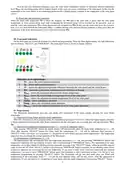
ІIІ. Front panel indications
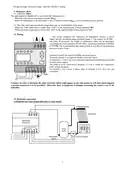
On the front panel are located all elements for control and programming. These are three digital display, ten light indications
and two buttons, “SELECT” and “PROGRAM”. The front panel vision is shown on Figure 1 bellow.
Fig.1
Indications on the digital display
1
2
3
4
5
6
7
8
9
Tb – shows the water heater temperature
Tp – shows solar panel temperature
∆Т – shows the adjusted temperature difference between the solar panel and the water heater
Wb – shows the water heater temperature level which has to be kept
Tbmax - shows the maximum allowed water heater temperature
Tpmin – shows the fixed minimum temperature level of the solar panel
Tpmax – shows the adjusted maximum temperature level of the solar panel
Alarm – shows emergency operation
Pump – shows the circulation pump operation
10 Tpdefrost – shows the adjusted temperature level for solar panel defrosting
IV. Programming
The Thermostat automatically goes into start mode, after connection to the power supply, showing the water heater
temperature:
4.1. Inspection of water heater and solar panel temperatures.
When the Thermostat is not in program mode, by consecutively pressing of “SELECT” button the digital display indication
is being switched over between the water heater temperature and the solar panel one, activating their relevant indications Tb or
Tp.
4.2. Inspection of temperatures mentioned at points 2.1 – 2.6 (see II. Operation, page 2.)
After pressing “PROGRAM” button the digital display will automatically show the temperature mentioned at 2.1 - ∆Т.
Then, after pressing “SELECT” button five times more the temperatures 2.2 – 2.6 will be indicated. Next pressing of
“SELECT” button will return you to position 4.1. (Inspection of water heater and solar panel temperatures). The temperature
inspection does not change the current operation of the Thermostat.
4.3. Programming of temperatures 2.1 – 2.6.
The digital display will automatically show the temperature mentioned at 2.1 - ∆Т, after pressing “PROGRAM” button. The
temperature indication will start blinking 10 times, after second pressing of “PROGRAM” button. The adjustment of the same
temperature can be done during the blinking time by repeatedly pressing of the “SELECT” button, within the possible adjusted
range. If until the 10th blink “SELECT” button is not pressed or “PROGRAM” button is pressed, the last blinking value will be
accepted as adjusted one concerning the relevant temperature. If you want to make some corrections concerning just adjusted
temperature, you need to press “PROGRAM” button again, thus returning to above mentioned actions. You can go to next
temperature programming by pressing “SELECT” button. The Thermostat will go into start mode after you finish with
programming of all temperatures from 2.1 – 2.6 and the new adjusted values will become current. After the adjustment of
temperature 2.6 you can return to 4.1 (Inspection of water heater and solar panel temperatures) by pressing “SELECT” button.
2

| General | Details |
|---|---|
| Name | INTIEL DT-3.1 Programmable Differential Thermostat User Manual |
| Make | INTIEL |
| Language | English |
| Filetype | PDF (Download) |
| File size | 0.18 MB |
 (1 votes, average: 5.00 out of 5)
 Loading...

INTIEL TD-3.1.1 Programmable Differential Thermostat User Manual


TECH CONTROLLERS EU-R-8b PLUS Wireless Two Position Room Thermostat User Manual

ENGO CONTROLS E10-B Wi-Fi Thermostat User Guide

Honeywell RTH6300B Programmable Thermostat Installation Guide

White-Rodgers 1F97-1277 Big Blue Single Stage Thermostat User Manual

AuVerte C501 Thermostat Installation Guide

ENGO CONTROLS E901RF Series Programmable Thermostat User Guide

DIGITEN DTC-101, DTC-151 Thermostat User Manual

HIVE 852031 Mini Wireless Heating Smart Thermostat Instructions

Honeywell T6811DP08 Digital Thermostat Instruction Manual

Robertshaw RS8110 Non Programmable Thermostat Instruction Manual