
Home > Ideal BOILERS > ideal BOILERS Combi RF Wireless Boiler Thermostat User Guide
ideal BOILERS Combi RF Wireless Boiler Thermostat User Guide

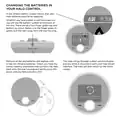



CHANGING THE BATTERIES IN
YOUR HALO CONTROL
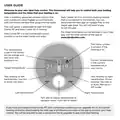
A red, empty battery symbol means that your
Halo batteries need to be replaced.
9:33p
Whether you have a desk or wall mounted unit
you will see the battery symbol on the base of
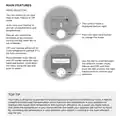
the unit. There are also two finger grabs top and
bottom as shown below. Use the finger grabs to
gently pull the Halo away from the rear housing.
Sat, 17 Nov
9:33pm
21 0 19 5
target temp
until 10:00pm
current room
temp
auto
mode
menu
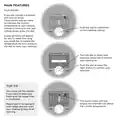
Remove all the old batteries and replace with
4 new AA Alkaline batteries. Check you have the
correct battery orientation then position the Halo
back onto the rear housing and gently push into
place until you feel a positive click.
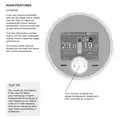
The Halo will go through a short synchronisation
process while it reconnects with your Halo Smart
Interface. The Halo will then return to the home
screen.
0%
Synchronisation to smart interface
in progress, please wait

| General | Details |
|---|---|
| Name | ideal BOILERS Combi RF Wireless Boiler Thermostat User Guide |
| Make | Ideal BOILERS |
| Language | English |
| Filetype | PDF (Download) |
| File size | 0.38 MB |
 (1 votes, average: 5.00 out of 5)
 Loading...


Commercial Electric HTSA15CWB Smart Thermostat User Guide

BEOK TGM50 Thermostat User Guide

EPH CONTROLS CDT2 Room Thermostat Instruction Manual

Wengart TP808 Wi-Fi Low Voltage Thermostat User Guide

GENERAL Life ARUNA 300S RF Wireless Room Thermostat User Guide

EONEBATW-B ZigBee Smart Thermostat User Guide

DELTA DORE Tybox 5701FP Pilot Wire Thermostat User Guide

Danfoss VIMCB20F Icon2 / 24V On Wall Mount Room Thermostat Installation Guide

Danfoss living eco Intelligent Radiator Thermostat User Guide

SIEMENS 194-2042 Pnuematic Room Thermostat User Guide