
Google Nest Learning Thermostat Installation Guide













Installing the Heat Link
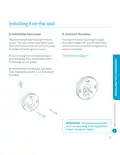
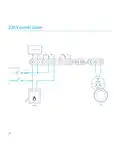
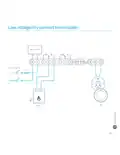
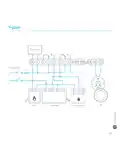
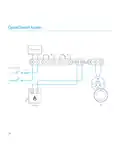
3. Connect to the thermostat wires
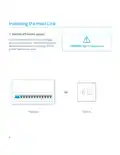
Skip to the next step if you’re installing
the Nest Thermostat on the stand and
are using the USB cable for power.
Take two wires from the wire bundle that
goes to the current thermostat and
attach them to the T1 and T2 terminals
on the Heat Link.
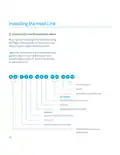
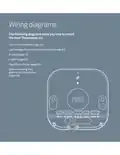
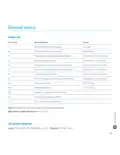
12 V DC power
Earth
OpenTherm (42 V DC max)
HOT WATER
Call-for-heat (normally open)
Common
Satisfied (normally closed)
HEATING
Call-for-heat (normally open)
Common
Satisfied (normally closed)
230 V AC live and neutral
input power
10

| General | Details |
|---|---|
| Name | Google Nest Learning Thermostat Installation Guide |
| Make | |
| Language | English |
| Filetype | PDF (Download) |
| File size | 0.3 MB |
 (1 votes, average: 5.00 out of 5)
 Loading...

Google G953-01573-01-A Nest 4th Gen Smart Wi-Fi Thermostat Owner’s Manual


Honeywell T874H Multistage Thermostat Instruction Manual

Danfoss 014G0013 Z Wave Radiator Thermostat Installation Guide

American Standard ACONT103 NP Non Programmable Heat Pump Thermostat Instruction Manual

Honeywell Home RTH Series X2S Smart Thermostat Installation Guide

Honeywell Home S200 Series FocusPRO Smart Thermostat User Guide

ICP Control Ion Gray Smart Thermostat Owner’s Manual

heatmiser Slimline-B V3 Programmable Room Thermostat Owner’s Manual

BEOK TDR89 Zigbee Room Thermostat User Guide

ezlo EZL-TSTAT-US Wave Thermostat Instruction Manual

Heatit Z-TEMP2 Thermostat Installation Guide