
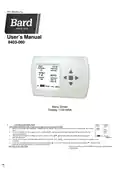
BARD THERMOSTAT Menu Driven Display 1120-445A User Manual




997-060180-21a
User’s Manual
8403-060
Menu Driven
Display 1120-445A
I.
CONTROLLER OPERATION
ADJUSTING TEMPERATURE (Temporary Override when in Programmable mode)
1. Before you can adjust the temperature, a MODE must be selected. If you are already in a Heating or Cooling mode, then skip to
step 5.
2. To select a MODE, use the keypad arrows to scroll to MODE, and then press the center button ■ on the key pad to enter the
operating mode menu.
3. Select the desired mode by scrolling up or down, with the arrows ▲▼, and then press the center button ■ on the keypad to
enter into that mode.
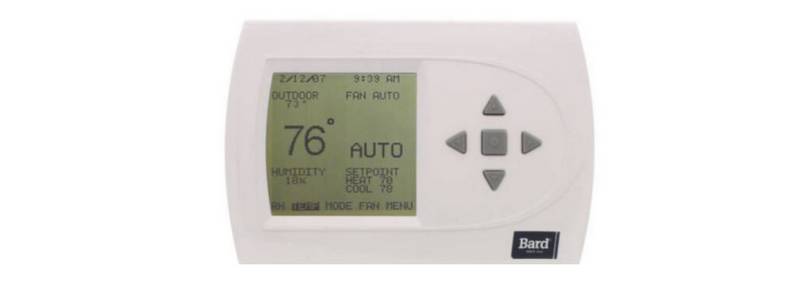
Figure1
4.
You are now returned to the Main Menu and Figure 1 is a similar view. NOTE: Outdoor temperature is only displayed if an outdoor sensor
is installed.
5. To increase the temperature set point, use the arrow up button ▲. To decrease the set point, use the arrow down button ▼. Press the center
button ■ on the key pad for the new set point to be effective.
SETTING DATE AND TIME
1. From the Main Menu, scroll to MENU and press the center button ■
on the keypad.


| General | Details |
|---|---|
| Name | BARD THERMOSTAT Menu Driven Display 1120-445A User Manual |
| Make | Bard |
| Language | English |
| Filetype | PDF (Download) |
| File size | 0.63 MB |
 (1 votes, average: 5.00 out of 5)
 Loading...

FantiniCosmi CH143E 230V Flush Mounting Weekly Programmable Thermostat User Manual

Honeywell Home S200 Series FocusPRO Smart Thermostat User Guide

GENERAL LIFE Mitra 230S RF Wireless Room Thermostat User Manual

Puravent CFST Frost Thermostat Installation Guide

heatit Z-TRM6 DC Z Wave Electronic Thermostat Instruction Manual

GENERAL LIFE FH250 Underfloor Heating Thermostat User Manual

ARISTON 3319126 CUBE S NET Wi-Fi Thermostat User Manual

GENERAL LIFE NORA 270S Digital Room Thermostat User Manual

MYSON Unisenza Plus Thermostat Instruction Manual

SALUS SQ610 Smart Thermostat User Guide