
Amber DT-two Programmable Thermostat User Guide




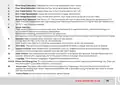


7. Hold Mode
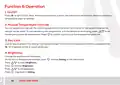
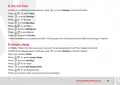
In Hold Mode, the thermostat will hold the set temperature until you cancel this mode.
On the actual temperature interface, press
to enter Setting on the thermostat.
O
Press
to enter Mode.
O
Press @ \ to select Hold Mode.
Press to enter Set Temperature.
O
Press @ \ to set temperature.
Press to back to the actual temperature interface.
O
8. Edit Settings
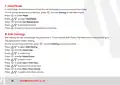
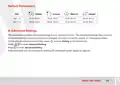
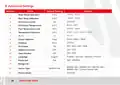
Edit setting can set and change the parameters. "If you choose Auto Mode, the thermostat runs according to
the parameters of Edit Setting.
On the actual temp interface, press
to enter Setting on the thermostat.
O
Press @ \ to select Edit Setting.
Press
to enter Select Day.
O
Press @ \ to select day.
Press to enter Select Event.
O
Press @ \ to select event.
Press to enter Start Time-Hour.
O
Press @ \ to select start time-hour.
Press to enter Start Time-minute.
O
Press @ \ to select start time-minute.
12

| General | Details |
|---|---|
| Name | Amber DT-two Programmable Thermostat User Guide |
| Make | Amber |
| Language | English |
| Filetype | PDF (Download) |
| File size | 0.38 MB |
 (1 votes, average: 5.00 out of 5)
 Loading...


KETOTEK KTF017802 Smart WiFi Thermostat Instructions

Aprilaire 8538 Digital Heat Cool Thermostat Owner’s Manual

GENERALLIFE HT300S Digital Room Thermostat User Manual

AVATTO WT598 Smart Thermostat Instruction Manual

UNILUX TA640FCW-ULX HVAC Thermostat User Manual

Honeywell CT3500 Programmable Thermostat User Guide

Beca BHT-008 Heating Thermostat User Guide

GENERAL LIFE ARUNA 304S RF Digital Room Thermostat User Manual

BEOK TGP508 Vertical Buttons Underfloor Heating Thermostat User Guide

LUX PSP511Ca Programmable Thermostat Instruction Manual