
Home > WarmlyYours > WarmlyYours TH115-AF-GA-08 SmartStat TH115 Series Thermostat Instruction Manual
WarmlyYours TH115-AF-GA-08 SmartStat TH115 Series Thermostat Instruction Manual
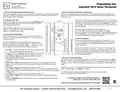


Programming Your
SmartStat TH115 Series Thermostat
1. Set the Thermostat Operation Mode Switches
4. Set the Comfort and Economy Temperatures
Remove the faceplate from the base unit and locate the three switches on the rear of the faceplate. During the programmed periods, the thermostat will operate at the Comfort temperature ( ).
For proper operation of the display and the floor warming system, all three switches should be in
the UP position. Refit the faceplate.
Between the programmed periods, the thermostat will set the temperature back to the Economy
temperature ( ).
The default Comfort setting is a floor temperature of 82 °F. To modify this
temperature, use the Up ( ) and Down ( ) buttons to reach the desired
temperature, and immediately press and hold the Comfort ( ) button
for 3 seconds. After another 5 seconds, the current floor temperature will
again be displayed.
2. Set the Day and Time
T
E
S
T
Open the side panels on the thermostat and put the On/Standby switch
to On. Press the Day button as many times as necessary to set the
thermostat to the correct day.
Press the Hour and Min buttons to set the correct time.
(PM hours are displayed with PM to the left of the time.
There is no such annotation for AM).
The default Economy setting is a floor temperature of
68 °F. To modify this temperature, use the Up ( ) and Down
(
) buttons to reach the desired temperature, and immediately press and
hold the Economy ( ) button for 3 seconds. After another 5 seconds,
the current floor temperature will again be displayed.
3. Program the Time Settings
Unless you want to leave your thermostat on the same temperature
24/7, you will need to set-up warming periods. You may program up to
four periods per day.
5. Recommendations
The commonly preferred Comfort temperature is between 80 °F and
85 °F. If you choose an Economy temperature that is much lower than
the Comfort temperature, the thermostat will take longer to reach the
Comfort temperature.
As a default, this thermostat is set to perform two warming periods
Monday – Friday (6:00am – 8:30am & 5:00pm – 11:00pm), and one
warming period Saturday and Sunday (6:00am – 11:00pm). To modify
this schedule, you will need to enter the Programming mode.
An Economy temperature of between 70 °F and 75 °F will ensure that
the thermostat will return quickly to the Comfort temperature while using
relatively little electricity. Every installation is different (subfloor, flooring,
insulation, perceived comfort level), and it is up to the end user to find
their most favorable settings.
1. Press Pgm. The screen will show a house with the number 1 inside
(
). This is the start of the first warming period.
2. To program the same settings for every day of the week, press and
hold Day for 3 seconds. All 7 days will then appear on the screen.
3. Use the Hour and Min buttons to select the start time of the first
warming period (default 6:00am).
6. Manual and Automatic Modes
The thermostat can be switched between Manual and Automatic modes by pressing the Mode/
Ret button. Manual mode is indicated by the hand ( ) icon, and Automatic mode is indicated by
4. Press Pgm to show the second house with the number 2
inside (
).
5. Use the Hour and Min buttons to select the end time of the first warming period (default
8:30am). If you only require one period each day, you will skip this setting by pressing the
Clear button.
the clock ( ) icon. Time and Temperature settings will only be respected in the Automatic (
mode.
)
6. Press Pgm to show the third house with the number 3 inside (
).
In Manual ( ) mode, the thermostat will hold the temperature constant at whatever level it has
7. Use the Hour and Min buttons to select the start time of the second warming period (default
been set with the Up ( ) and Down ( ) buttons.
5:00pm). If you only require one warming period each day, you will skip this setting by pressing
the Clear button.
8. Press Pgm to show the fourth house with the number 4 inside (
For further information or for personalized assistance in setting your thermostat,
please call WarmlyYours at (800) 875-5285.
).
9. Use the Hour and Min buttons to select the end time of the second heating period (default
11:00pm).
For additional support and installation instructions,
please visit or scan our support QR code:
10. Press the Mode/Ret button to show the Clock icon ( ), indicating the thermostat is now in
Automatic Mode.
Rev 02/22

| General | Details |
|---|---|
| Name | WarmlyYours TH115-AF-GA-08 SmartStat TH115 Series Thermostat Instruction Manual |
| Make | WarmlyYours |
| Language | English |
| Filetype | PDF (Download) |
| File size | 0.22 MB |
 (1 votes, average: 5.00 out of 5)
 Loading...

WarmlyYours 670078B Wifi LED Touch Thermostat User Manual

WarmlyYours UTN5-4999 Thermostat User Guide


tuya BHT-005 Wifi Heating Thermostat User Manual

WHITE-RODGERS 1F91-71 Multi Stage Electronic Digital Thermostat Installation Guide

WARMZONE UWG5 WiFi LED Touch Thermostat User Guide

DEVI 316 Electronic Thermostat Installation Guide

DIGITEN DTC-101, DTC-151 Thermostat User Manual

SALUS RT520 Programmable Thermostat User Guide

Honeywell Home ElitePRO S1200 Smart Thermostat User Guide

Honeywell TH5000 Series FocusPRO Non-Programmable Digital Thermostat Installation Guide

emos P56211 Wireless Room Thermostat Instruction Manual

White Rodgers 1F78-151 Non Programmable Thermostat Instructions