×
- 1. Lyric Round Wi-fi Thermostat (Quick Start Guide)
- 2. Compatibility (Optional: 24vac Power ('c' Wire) → Lyrics Implementation Of Apple Homekit Requires 24vac Power ('c' Wire) → For Help, Contact:)
- 3. Tools You Will Need: Phillips Screwdriver, Small Flat Head Screwdriver, Ballpoint Pen, Home Wi-fi Password, Honeywell Lyric App, Needle-nose…
- 4. Before You Begin (Download The Honeywell Lyric App)
- 5. Turn Power Off (Check That Your System Is Off)
- 6. Remove The Old Thermostats Faceplate (Make Sure There Are No 120-240v Wires)
- 7. Take A Picture Of The Old Wiring (Remove Any Jumpers)
- 8. Record If You Have Wires In The Following Terminals (Record The Existing Wire Configuration → If The Wires Are In Terminals That Are Not Listed, You Will Need Additional Wiring Support)
- 9. Disconnect The Wires And Remove Old Wall Plate (Insert The Recommended Wall Anchors)
- 10. Check For Any Paint Gaps Or Screw Holes Left By The Old Thermostat (Bundle And Insert Wires Through The Clear Rubber Holder)
- 11. R-switch (Insert Wire(s) Into Terminal(s) → R Wire → Rc Wire → Rh Wire)
- 12. Firmly Connect Remaining Wires From Step 8 (Use The Provided Screws To Mount The Wall Plate)
- 13. Turn Your Power On
- 14. Log In To Configure And Connect (Your Lyric Thermostat Is Not Yet Configured → To Complete Your Setup, Download And Log In To The Honeywell Lyric App.)
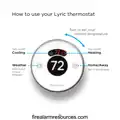
- 15. How To Use Your Lyric Thermostat (Turn To Set Your Desired Temperature → Turn On/off → Cooling → Heating → Weather → Home/away)
- 16. How To Use Your Lyric App (Access The Menu → Use Shortcuts To Easily Activate → Change Mode → Set Away → View Weather Forecast → Set Desired Temperature)
- 17. Get The Most From Lyric (Location Based Temperature Control → Custom Shortcuts → Comfort → Smart Alerts → Adaptive Recovery → Auto Changeover)
- 18.
- 19. Lyric Round Wi-fi Thermostat (Wi-fi Is A Registered Trademark → Of Wi-fi Alliance → Automation And Control Solutions → Honeywell International Inc.)
- 20. Thermostat Wi-fi Lyric Round (Guide De Démarrage Rapide)
- 21. Compatibilité (Compatible Avec La Plupart Des Systèmes De Chauffage, Refroidissement Et Thermopompes → En Option : Alimentation De 24 V C.a. (fil C) → Lutilisation Dapple Homekit Avec Votre Thermostat Lyric Requiert Une Alimentation De 24 V C.a. (fil C). → Pour Obtenir De Laide, Veuillez Contacter :)
- 22. Outils Requis (Application Lyric Honeywell → Pour Configurer Le Système Et Connecter Votre Téléphone Intelligent → Téléphone Intelligent)
- 23. Téléchargez Lapplication Lyric De Honeywell Sur Votre Téléphone Intelligent. Ce Document Ne Constitue Pas Un Guide Autonome.
- 24. Coupez Lélectricité (Vérifiez Que Lappareil Nest Pas Sous Tension)
- 25. Retirez La Plaque Frontale De Lancien Thermostat (Assurez-vous Quil Ny A Aucun Fil De 120/240 V)
- 26. Prenez Une Photo De Lancien Câblage (Retirez Tous Les Cavaliers → Le Thermostat Lyric Ne Fonctionne Pas Avec Des Cavaliers.)
- 27. Notez La Configuration De Câblage Existante. (Notez La Couleur Des Fils Branchés Dans Les Bornes De Lancien Thermostat. → Si Les Fils Sont Dans Des Bornes Non Énumérées, Une Assistance Supplémentaire Sera Requise Pour Le Câblage. → Visitez Lyric.honeywell.com/support/installation Pour Déterminer Si Le Thermostat Lyric Fonctionnera Dans Votre Configuration.)
- 28. Débranchez Les Fils Et Retirez Lancienne Plaque Murale (Insérez Les Ancres Murales Recommandées → Taille Du Foret 7/32 Po)
- 29. Vérifiez Quil Ny A Pas De Zones Non Peintes Ou De Trous De Vis Laissés Par Lancien Thermostat. Si Vous Choisissez Dutiliser Le Couvercle Mur…
- 30. Réglez Le Contacteur R (Contacteur R → Fil R → Fil Rc → Fil Rh)
- 31. Connectez Fermement Les Fils Restants (Utilisez Les Vis Fournies Pour Monter La Plaque Murale)
- 32. Enclenchez Fermement Le Thermostat En Position (Rétablissez Lalimentation)
- 33. Connectez-vous Pour La Configuration Et La Connexion (Android → Ios)
- 34. Comment Utiliser Le Thermostat Lyric (Mise En Marche/arrêt → Refroidissement → Chauffage → Météo → À La Maison/afficher Les Prévisions Sur 6 Et 12 Heures → Absent)
- 35. Comment Utiliser Lapplication Lyric (Accéder Au Menu → Utiliser Les Raccourcis → Changer Le Mode → Régler Sur Absent → Afficher Les Prévisions Météo → Régler La Température Désirée)
- 36. Obtenez Tous Les Avantages De Lyric (Contrôle De La Température En Fonction De Lemplacement → Raccourcis Personnalisés → Confort → Alertes Intelligentes → Récupération Adaptative → Commutation Automatique)
- 37.
- 38. Thermostat Wi-fi Lyric Round (Solutions De Régulation Et Dautomatisation → Honeywell International Inc.)
- 39. Ter Mostato Con Conexión Wifi Lyric Round (Guía Para La Activación Rápida)
- 40. Compatibilidad (No Trabaja Con Calefacción Eléctrica De Zócalo (120-240v) → Compatible Con La Mayoría De Los Otros Sistemas De Calefacción, Refrigeración Y Bomba De Calor → Opcional: Alimentación De 24 V Ca (cable 'c') → La Implementación De Lyric Del Kit Para El Hogar De Apple Requiere Electricidad De 24 V Ca ('cable C'))
- 41. Herramientas Que Necesitará (Para Configurar Su Sistema Y Conectarlo A Su Teléfono Inteligente → Aplicación Lyric De Honeywell → Pelacables* → Pinzas De Punta Fina*)
- 42. Antes De Comenzar (Descargue La Aplicación Lyric De Honeywell)
- 43. Desconecte El Suministro De Energía Eléctrica (Compruebe Que El Sistema Está Apagado)
- 44. Retire La Placa Frontal Del Termostato (Compruebe Que No Hayan Cables De 120/240 V)
- 45. To Me Una Foto Del Cableado Existente (Retire Los Puentes → El Termostato Lyric No Trabaja Con Puentes)
- 46. Registre Si Tiene Cables En Los Siguientes Terminales (Revise Todos Los Que Sean Pertinentes: → Registre La Configuración Actual De Los Cables → Anote El Color De Los Cables Que Están Conectados En Los Terminales Del Termostato Existente → Si Los Cables Están En Terminales Que No Están Listados, Necesitará Un Soporte De Cableado Adicional)
- 47. Desconecte Los Cables Y Retire La Placa De Pared Existente (Inserte Los Tarugos De Pared Recomendados → Tamaño De La Broca Del Taladro)
- 48. Revise La Pared Para Constatar Si Quedaron Áreas Sin Pintar O Agujeros De Tornillos Del Termostato Existente (Agrupe E Inserte Los Cables A Través Del Soporte Transparente De Goma)
- 49. Revise Su Respuesta Del Paso 7 (Interruptor R → Cable R → Cable Rc → Cable Rh)
- 50. Conecte Firmemente Los Cables Restantes Del Paso 8 (Utilice Los Tornillos Que Se Suministran Para Instalar La Placa De Pared)
- 51. Coloque La Presión El Termostato Firmemente En Su Lugar.
- 52. Inicie La Sesión Para Configurar Y Conectar (Su Termostato Lyric No Está Aún Configurado Para Controlar El Sistema De Calefacción/refrigeración. → Para Finalizar Su Configuración, Descargue E Inicie La Sesión En La Aplicación Lyric De Honeywell.)
- 53. Cómo Utilizar El Termostato Lyric (Gire Para Configurar La Temperatura Deseada. → Encienda/apague → Refrigeración → Calefacción → Clima → Fuera De Casa)
- 54. Cómo Utilizar Su Aplicación Lyric (Tener Acceso Al Menú → Utilizar Los Accesos Directos → Cambiar El Modocalefacción, Refrigeración O Apagado → Configurar Fuera De Casa → Ver La Predicción Del Tiempo → Configurar La Temperatura Deseada)
- 55. Obtenga El Máximo De Lyric (Control De Temperatura Basado En La Ubicación → Accesos Directos Personalizados → Confort → Alertas Inteligentes → Reactivación Adaptable → Conversión Automática)
- 56.
- 57. Termostato Con Conexión Wifi Lyric Round
×
Honeywell RCH9310 Lyric Round WiFi Thermostat User Guide
Compatibilidad
No trabaja con calefacción eléctrica de zócalo (120-240V)
Compatible con la mayoría de los otros sistemas de calefacción, refrigeración y bomba
de calor
Opcional: Alimentación de 24 V CA (cable “C”)
La implementación de Lyric del kit para el hogar de Apple requiere electricidad de
24 V CA (“cable C”)
Para obtener ayuda comuníquese por:
LA WEB lyric.honeywell.com
EL CORREO ELECTRÓNICO MyLyric@honeywell.com
EL TELÉFONO 1-800-633-3991
LAS REDES SOCIALES Twitter: @Honeywell_Home, Facebook: Honeywell Home
42
firealarmresources.com
Esta caja incluye:
AAA
Termostato
Placa de pared
Tornillos
Tarugos
Cubierta de pared opcional
43
firealarmresources.com
| General | Details |
|---|---|
| Name | Honeywell RCH9310 Lyric Round WiFi Thermostat User Guide |
| Make | Honeywell |
| Language | English |
| Filetype | PDF (Download) |
| File size | 0.9 MB |

Honeywell T6 Pro Programmable Thermostat User Manual

Honeywell D1-528 Direct Thermostat Installation Guide

Honeywell FocusPRO P200 Programmable Thermostat User Guide

Honeywell RCHT8610WF Series Smart Thermostat Installation Guide

Honeywell T9 Smart Thermostat Installation Guide

Honeywell TH2320WF4011 FocusPRO Smart S200 Series Thermostat User Guide

Honeywell TL116A Thermostat Installation Guide

T10 Pro Smart Thermostat with Redlink Room Sensor

Honeywell TH6320WF2003 Lyric T6 Pro Wi-Fi Programmable Thermostat User Guide

Honeywell RTH9580 Wi-Fi Color Touchscreen Programmable Thermostat User Guide


BOSCH BCC110 Connected Control Thermostat Instruction Manual

BEOK TGW60 Glass Screen Thermostat Instruction Manual

Tense STC-1000 Thermostat User Guide

PECO TW180 Thermostat Instruction Manual

Smart Temp SMT-850 Halo Thermostat User Guide

Schluter Systems DITRA-HEAT-E-RS1 Floor Warming Thermostat User Guide

Honeywell CMR707A1049 Programmable Room Thermostat User Guide

EPH CONTROLS COMBIPACK2 Smart Thermostat with Automation and Optimum Start Instructions

GENERALLIFE MITRA 230S RF Wireless Room Thermostat User Manual

DAIKIN DTST-ONE-ADA-A One Lite Connected Thermostat User Guide
Table of Contents
- 1. Lyric Round Wi-fi Thermostat - Quick Start Guide →
- 2. Compatibility - Optional: 24vac Power ('c' Wire) →
- 3. Tools You Will Need: Phillips Screwdriver, Small Flat Head S... →
- 4. Before You Begin - Download The Honeywell Lyric App →
- 5. Turn Power Off - Check That Your System Is Off →
- 6. Remove The Old Thermostats Faceplate - Make Sure There Are N... →
- 7. Take A Picture Of The Old Wiring - Remove Any Jumpers →
- 8. Record If You Have Wires In The Following Terminals - Record... →
- 9. Disconnect The Wires And Remove Old Wall Plate - Insert The ... →
- 10. Check For Any Paint Gaps Or Screw Holes Left By The Old Ther... →
- 11. R-switch - Insert Wire(s) Into Terminal(s) →
- 12. Firmly Connect Remaining Wires From Step 8 - Use The Provide... →
- 13. Turn Your Power On →
- 14. Log In To Configure And Connect - Your Lyric Thermostat Is N... →
- 15. How To Use Your Lyric Thermostat - Turn To Set Your Desired ... →
- 16. How To Use Your Lyric App - Access The Menu →
- 17. Get The Most From Lyric - Location Based Temperature Control →
- 18. Page 18 →
- 19. Lyric Round Wi-fi Thermostat - Wi-fi Is A Registered Tradema... →
- 20. Thermostat Wi-fi Lyric Round - Guide De Démarrage Rapide →
- 21. Compatibilité - Compatible Avec La Plupart Des Systèmes De C... →
- 22. Outils Requis - Application Lyric Honeywell →
- 23. Téléchargez Lapplication Lyric De Honeywell Sur Votre Téléph... →
- 24. Coupez Lélectricité - Vérifiez Que Lappareil Nest Pas Sous T... →
- 25. Retirez La Plaque Frontale De Lancien Thermostat - Assurez-v... →
- 26. Prenez Une Photo De Lancien Câblage - Retirez Tous Les Caval... →
- 27. Notez La Configuration De Câblage Existante. - Notez La Coul... →
- 28. Débranchez Les Fils Et Retirez Lancienne Plaque Murale - Ins... →
- 29. Vérifiez Quil Ny A Pas De Zones Non Peintes Ou De Trous De V... →
- 30. Réglez Le Contacteur R - Contacteur R →
- 31. Connectez Fermement Les Fils Restants - Utilisez Les Vis Fou... →
- 32. Enclenchez Fermement Le Thermostat En Position - Rétablissez... →
- 33. Connectez-vous Pour La Configuration Et La Connexion - Andro... →
- 34. Comment Utiliser Le Thermostat Lyric - Mise En Marche/arrêt →
- 35. Comment Utiliser Lapplication Lyric - Accéder Au Menu →
- 36. Obtenez Tous Les Avantages De Lyric - Contrôle De La Tempéra... →
- 37. Page 37 →
- 38. Thermostat Wi-fi Lyric Round - Solutions De Régulation Et Da... →
- 39. Ter Mostato Con Conexión Wifi Lyric Round - Guía Para La Act... →
- 40. Compatibilidad - No Trabaja Con Calefacción Eléctrica De Zóc... →
- 41. Herramientas Que Necesitará - Para Configurar Su Sistema Y C... →
- 42. Antes De Comenzar - Descargue La Aplicación Lyric De Honeywe... →
- 43. Desconecte El Suministro De Energía Eléctrica - Compruebe Qu... →
- 44. Retire La Placa Frontal Del Termostato - Compruebe Que No Ha... →
- 45. To Me Una Foto Del Cableado Existente - Retire Los Puentes →
- 46. Registre Si Tiene Cables En Los Siguientes Terminales - Revi... →
- 47. Desconecte Los Cables Y Retire La Placa De Pared Existente -... →
- 48. Revise La Pared Para Constatar Si Quedaron Áreas Sin Pintar ... →
- 49. Revise Su Respuesta Del Paso 7 - Interruptor R →
- 50. Conecte Firmemente Los Cables Restantes Del Paso 8 - Utilice... →
- 51. Coloque La Presión El Termostato Firmemente En Su Lugar. →
- 52. Inicie La Sesión Para Configurar Y Conectar - Su Termostato ... →
- 53. Cómo Utilizar El Termostato Lyric - Gire Para Configurar La ... →
- 54. Cómo Utilizar Su Aplicación Lyric - Tener Acceso Al Menú →
- 55. Obtenga El Máximo De Lyric - Control De Temperatura Basado E... →
- 56. Page 56 →
- 57. Termostato Con Conexión Wifi Lyric Round →