
×
- 1. Installation And Usage Instructions (Etherma Ebasic → Room, Combi Floor Thermostat)
- 2. Angaben Zum Energieverbrauch (Information About Energy Consumption → Informatie Over Energieverbruik → Informations Sur La Consommation Dénergie → Indicazioni Sul Consumo Di Energia)
- 3. Ebasic (Einleitung → Installation → Bedienung → Technische Daten → Haftungsausschluss)
- 4. Bluetooth (Spannungsversorgung → Maximale Belastung → Temperaturbereich → Temperaturabsenkung → Ip-klasse → Standardfarbe)
- 5. Die Bluetooth Marke Und -logos Sind Eigentum Von Bluetooth Sig, Inc., Und Ihre Verwendung Ist Für Taelek Oy Lizenziert. Andere Marken Und Ha…
- 6. I N S T A L L A T I O N (Setback)
- 7. Positionieren Sie Nun Das Thermostat Und Befestigen Sie Es Mit 2 Schrauben In Der Wandeinbaudose. Montieren Sie Die Abdeckteile, Befestigen …
- 8. I N B E T R I E B N A H M E (Name Des Thermostats → Modus → Bodentemperatur Min → Bodentemperatur Max → Lufttemperatur Min → Lufttemperatur Max)
- 9. Anwenderprogramm Aktivierte Eco-temp (Extern Aktivierte Öko-temp → Ventilschutz → Fühlertyp → Led Intensität → Netzwerkschlüssel → Wochenprogramm)
- 10. B E N U T Z E R H A N D B U C H (Grundbedienung → Led-anzeigeleuchten Zeigen Den Status An:)
- 11. Erweiterte Benutzung
- 12. Einstellungen (Name Des Thermostats → Heizmodus → Bodentemperatur Min Und Max)
- 13. Bodentemperatur-offset (kalibrierung) (Lufttemperatur Min Und Max → Lufttemperatur-offset (kalibrierung))
- 14. Pwm Min Und Max (Benutzerprogramm Aktiviert Eco Temp → Extern Aktivierte Eco-temp → Ventilschutz)
- 15. Einstellungen (Fühlertyp → Led-helligkeit → Anwenderprogramm-modus → Drahtloser Temperaturfühler)
- 16. Einstellungen (Empfangen Von Drahtlosen Eco Steuerungen → Netzwerkschlüssel Und Bestätigen Des Netzwerkschlüssels)
- 17. Wochennplan (Echtzeit Im Thermostat → Komfort-/eco-status → Programmierung Der Temperatur → Warnung Bei Ungültiger Echtzeit → Backup Für Stromunterbrechung)
- 18. F E H L E R M O D I (Mögliche Fehlercodes → Fehler Des Bodenfühlers → Überhitzung → Interner Fehler → Kalenderzeit Ist Nicht Gültig)
- 19. Ecocontrol App (Verbindung → Benutzerhandbuch)
- 20.
- 21. E B A S I C - S E T U P En
- 22. T E C H N I C A L (Bluetooth → Power Supply → Maximum Load → Temperature Range → Ip Class → Standard Color)
- 23. The Bluetooth Trademark And Logos Are Owned By Bluetooth Sig, Inc. And Their Use Is Licensed To Taelek Oy. Other Trademarks And Trade Names …
- 24. Installation
- 25. Now Position The Thermostat And Fasten It In The Wall Installation Box With 2 Screws. Install The Cover Parts, Fasten Them With The Screw An…
- 26. C O M M I S S I O N I N G (Name Of The Thermostat → Mode → Floor Temperature Min → Floor Temperature Max → Air Temperature Min → Air Temperature Max)
- 27. User Program Activated Eco-temp: (Externally Activated Eco-temp: → Valve Protection: → Sensor Type: → Led Intensity: → Weekly Program:)
- 28. Basic Operation
- 29. Additionally With Econtrol App (Extended Use)
- 30. S E T T I N G S (Thermostat Name → Heating Mode → Floor Temperature Min And Max)
- 31. Floor Temperature Offset (calibration) (Air Temperature Min And Max → Air Temperature Offset (calibration))
- 32. S E T T I N G S (Pwm Min And Max → User Program Activated Eco-temp → Externally Activated Eco-temp → Valve Protection)
- 33. S E T T I N G S (Feeding Type → Led Brightness → User Program Mode → Wireless Temperature Sensor)
- 34. Settings (Receiving Wireless Eco Controls → Network Key And Confirming The Network Key)
- 35. Weekly Schedule (You Can Create A 24/7 Weekly Schedule In The Econtrol App. The Weekly Schedule Allows You To Program The Thermostat To Lower The Temperature During Periods When The Room Is Not In Use.)
- 36. E R R O R M O D E S (Floor Sensor Error → Overheating → Internal Error → Calendar Time Is Not Valid)
- 37. Ecocontrol App Connection
- 38.
- 39. E B A S I C - S E T - U P Nl
- 40. Bluetooth: (Stroomvoorziening: → Maximale Belasting: → Temperatuurbereik: → Ip-klasse: → Standaard Kleur: → Sensor:)
- 41. Het Handelsmerk En De Logo's Van Bluetooth Zijn Eigendom Van Bluetooth Sig, Inc. En Het Gebruik Ervan Is In Licentie Gegeven Aan Taelek Oy.
- 42. Installatie (Set-back → Verwarming (n) → Vloersensor → Verwarmen (l))
- 43. Plaats Nu De Thermostaat En Bevestig Hem Met 2 Schroeven In De Muur.
- 44. I N G E B R U I K N A M E (Thermostaat Naam → Modus → Bodemtemperatuur Min → Bodemtemperatuur Max → Luchttemperatuur Min → Luchttemperatuur Max)
- 45. Gebruik De Econtrol-app Om Instellingen Te Controleren En Te Wijzigen.
- 46. Gebruikershandleiding (Basisbediening)
- 47. Speciaal Met De Econtrol-app (Uitgebreid Gebruik)
- 48. I N S T E L L I N G E N (Naam Thermostaat → Verwarmingsmodus → Vloertemperatuur Min. En Max.)
- 49. Vloertemperatuur Offset (kalibratie) (Luchttemperatuur Min En Max → Luchttemperatuur Offset (kalibratie))
- 50. I N S T E L L I N G E N (Gebruikersprogramma Geactiveerde Eco-temp → Extern Geactiveerde Eco-temp → Ventielbescherming)
- 51. Installeren En (Type Sensor → Led-helderheid → Gebruiker Programmeermodus → Draadloze Temperatuursensor)
- 52. I N S T E L L I N G E N (Ontvangst Van Draadloze Eco-bediening → Netwerksleutel En Bevestigen Van De Netwerksleutel)
- 53. Schematische Weergave (/7 Weekschema Maken → Thermostaat Programmeren → Comfort-/eco-status → Correcte Reële Tijd → Ongeldige Reële Tijd → Real-time Bijwerken)
- 54. Foutmodi (Storing In De Vloersensor → Oververhitting → Interne Fout → Kalendertijd Is Niet Geldig)
- 55. V E R B I N D I N G (E T H E R M A → E C O N T R O L - A P P)
- 56.
- 57. E B A S I C - S E T U P Fr
- 58. Données Techniques (Bluetooth → Alimentation Électrique → Charge Maximale → Plage De Température → Classe Ip → Couleur Standard)
- 59. La Marque Et Les Logos Bluetooth Sont La Propriété De Bluetooth Sig, Inc. Et Taelek Oy Dispose D'une Licence D'utilisation. Les Autres Marqu…
- 60. I N S T A L L A T I O N (Setback → Chauffage (n) → Capteur De Plancher → Chauffer (l))
- 61. Positionnez Maintenant Le Thermostat Et Fixez-le Avec 2 Vis Dans Le Boîtier Mural. Montez Les Pièces Du Couvercle, Fixez-les Avec La Vis Et …
- 62. M I S E E N S E R V I C E (Nom Du Thermostat → Mode → Température Min Du Sol → Température Max Du Sol → Température Min De L'air → Température Max De L'air)
- 63. Température Éco Du Programme (Température Éco De L'extérieur → Protection Des Soupapes → Type De Capteur → Intensité De La Lumière → Clé De Réseau → Programme Hebdomadaire)
- 64. Fonctionnement De Base (Des Voyants Lumineux Indiquent Le Statut)
- 65. Utilisation Avancée
- 66. Paramètres (Nom Du Thermostat → Mode De Chauffage → Température Min Et Max Du Sol)
- 67. Décalage De La Température Du Sol (étalonnage) (Température Min Et Max De L'air → Décalage De La Température De L'air (étalonnage))
- 68. Paramètres (Mli Min Et Max → Température Éco Du Programme Utilisateur → Température Éco De L'extérieur → Protection Des Soupapes)
- 69. Paramètres (Type De Capteur → Luminosité Led → Mode Programme Utilisateur → Capteur De Température Sans Fil)
- 70. Paramètres (Réception Des Commandes Éco Sans Fil → Clé De Réseau Et Confirmation De La Clé De Réseau)
- 71. P R O G R A M M E (H E B D O M A D A I R E → L'exécution Du Programme Hebdomadaire Nécessite Un Temps Réel Correct Dans Le Thermostat.)
- 72. M O D E S (D ' E R R E U R)
- 73. C O N N E X I O N À L'application Etherma (E C O N T R O L)
- 74.
- 75. E B A S I C - I N S T A L L A Z I O N E It
- 76. Bluetooth (Tensione Di Alimentazione → Carico Massimo → Gamma Di Temperatura → Riduzione Della Temperatura Esterna → Classe Ip → Colore Standard)
- 77. Il Marchio E Il Logo Bluetooth Sono Proprietà Di Bluetooth Sig, Inc. E Il Loro Uso È Concesso In Licenza A Taelek Oy. Gli Altri Marchi E Nom…
- 78. Installazione (Setback → Riscaldamento(n) → Riscaldamento(l))
- 79. Posizionare Ora Il Termostato E Fissarlo Con 2 Viti Nella Scatola Di Montaggio A Muro. Montare Le Parti Di Copertura, Fissarle Con La Vite E…
- 80. M E S S A (I N F U N Z I O N E → Nome Del Termostato → Compensazione Della Temperatura Del Pavimento (calibrazione) → Compensazione Della Temperatura Dell'aria (calibrazione))
- 81. It (Pwm Min: → Pwm Max: → Eco-temp Attivato Dal Programma Utente: → Protezione Della Valvola: → Tipo Di Sensore: → Intensità Del Led: → Programma Settimanale:)
- 82. M A N U A L E (U T E N T E → Funzionamento Di Base)
- 83. Utilizzo Esteso
- 84. Impostazioni (Nome Del Termostato → Modalità Di Riscaldamento → Temperatura Del Pavimento Min E Max)
- 85. Compensazione Della Temperatura Del Pavimento (calibrazione) (Temperatura Dell'aria Min E Max → Compensazione Della Temperatura Dell'aria (calibrazione))
- 86. Pwm Min E Max (Il Programma Utente Attiva Eco Temp → Eco-temp Attivato Esternamente → Protezione Della Valvola)
- 87. Imposizioni (Tipo Di Sensore → Luminosità Led → Modalità Del Programma Utente → Sensore Di Temperatura Senza Fili)
- 88. I M P O S T A Z I O N I (Ricezione Dei Controlli Eco Senza Fili → Chiave Di Rete E Conferma Della Chiave Di Rete)
- 89. Programma Settimanale (Impostazione Del Termostato → Stato Comfort/eco → Esecuzione Del Programma → Aggiornamento Del Tempo Reale)
- 90. M O D A L I T À D I E R R O R E (Errore Del Sensore Da Pavimento → Surriscaldamento → Errore Interno → Il Tempo Di Calendario Non È Valido)
- 91. It (Connessione Dell'app → Etherma Econtrol → Utilizzo Dell'applicazione Per Dispositivi Mobili)
- 92. Etherma Elektrowärme Gmbh
×
ETHERMA 3 set 2024 Smart Thermostat Instruction Manual




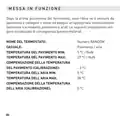


I N G E B R U I K N A M E
Nadat de thermostaat voor de eerste keer wordt ingeschakeld, detec-
teert de thermostaat of er een vloersensor is aangesloten en voert een
geschikte initialisatie uit (selectie tussen vloer- en luchtmodus). De
volgende instellingen worden net zo geïnitialiseerd (grond/lucht).
THERMOSTAAT NAAM:
MODUS:
RANDOM nummer
Bodem / Lucht
5 °C / NaN
BODEMTEMPERATUUR MIN:
BODEMTEMPERATUUR MAX:
BODEMTEMPERATUURCOMPENSATIE
(KALIBRATIE):
27 °C / NaN
- 3 °C
5 °C
LUCHTTEMPERATUUR MIN:
LUCHTTEMPERATUUR MAX:
28 °C
LUCHTTEMPERATUUR OFFSET (KALIBRATIE): 0 °C
44

| General | Details |
|---|---|
| Name | ETHERMA 3 set 2024 Smart Thermostat Instruction Manual |
| Make | ETHERMA |
| Language | English |
| Filetype | PDF (Download) |
| File size | 0.29 MB |
 (1 votes, average: 5.00 out of 5)
 Loading...


GTS TR8100V WiFi Pairing Thermostat Instruction Manual

Danfoss FH-RT Wireless Room Thermostat Installation Guide

Danfoss Heating Solutions WT-T BasicPlus2 Room Thermostat Installation Guide

BEOK CONTROLS WiFI-EP WiFi Thermostat User Guide

Honeywell T4 Lockout Change Thermostat User Manual

ESP ECSPST Fort Programmable Thermostat User Manual

RET-230-HC-3 Electronic Heat Cool Thermostat User Manual

meross T6R Wireless Smart Thermostat User Manual

AJAX108845 White Digital Programmable Thermostat User Guide

RITTAL SK 3114.200 Digital Enclosure Internal Temperature Display and Thermostat Instructions
Table of Contents
- 1. Installation And Usage Instructions - Etherma Ebasic →
- 2. Angaben Zum Energieverbrauch - Information About Energy Cons... →
- 3. Ebasic - Einleitung →
- 4. Bluetooth - Spannungsversorgung →
- 5. Die Bluetooth Marke Und -logos Sind Eigentum Von Bluetooth S... →
- 6. I N S T A L L A T I O N - Setback →
- 7. Positionieren Sie Nun Das Thermostat Und Befestigen Sie Es M... →
- 8. I N B E T R I E B N A H M E - Name Des Thermostats →
- 9. Anwenderprogramm Aktivierte Eco-temp - Extern Aktivierte Öko... →
- 10. B E N U T Z E R H A N D B U C H - Grundbedienung →
- 11. Erweiterte Benutzung →
- 12. Einstellungen - Name Des Thermostats →
- 13. Bodentemperatur-offset (kalibrierung) - Lufttemperatur Min U... →
- 14. Pwm Min Und Max - Benutzerprogramm Aktiviert Eco Temp →
- 15. Einstellungen - Fühlertyp →
- 16. Einstellungen - Empfangen Von Drahtlosen Eco Steuerungen →
- 17. Wochennplan - Echtzeit Im Thermostat →
- 18. F E H L E R M O D I - Mögliche Fehlercodes →
- 19. Ecocontrol App - Verbindung →
- 20. Page 20 →
- 21. E B A S I C - S E T U P En →
- 22. T E C H N I C A L - Bluetooth →
- 23. The Bluetooth Trademark And Logos Are Owned By Bluetooth Sig... →
- 24. Installation →
- 25. Now Position The Thermostat And Fasten It In The Wall Instal... →
- 26. C O M M I S S I O N I N G - Name Of The Thermostat →
- 27. User Program Activated Eco-temp: - Externally Activated Eco-... →
- 28. Basic Operation →
- 29. Additionally With Econtrol App - Extended Use →
- 30. S E T T I N G S - Thermostat Name →
- 31. Floor Temperature Offset (calibration) - Air Temperature Min... →
- 32. S E T T I N G S - Pwm Min And Max →
- 33. S E T T I N G S - Feeding Type →
- 34. Settings - Receiving Wireless Eco Controls →
- 35. Weekly Schedule - You Can Create A 24/7 Weekly Schedule In T... →
- 36. E R R O R M O D E S - Floor Sensor Error →
- 37. Ecocontrol App Connection →
- 38. Page 38 →
- 39. E B A S I C - S E T - U P Nl →
- 40. Bluetooth: - Stroomvoorziening: →
- 41. Het Handelsmerk En De Logo's Van Bluetooth Zijn Eigendom Van... →
- 42. Installatie - Set-back →
- 43. Plaats Nu De Thermostaat En Bevestig Hem Met 2 Schroeven In ... →
- 44. I N G E B R U I K N A M E - Thermostaat Naam →
- 45. Gebruik De Econtrol-app Om Instellingen Te Controleren En Te... →
- 46. Gebruikershandleidin... - Basisbediening →
- 47. Speciaal Met De Econtrol-app - Uitgebreid Gebruik →
- 48. I N S T E L L I N G E N - Naam Thermostaat →
- 49. Vloertemperatuur Offset (kalibratie) - Luchttemperatuur Min ... →
- 50. I N S T E L L I N G E N - Gebruikersprogramma Geactiveerde E... →
- 51. Installeren En - Type Sensor →
- 52. I N S T E L L I N G E N - Ontvangst Van Draadloze Eco-bedien... →
- 53. Schematische Weergave - /7 Weekschema Maken →
- 54. Foutmodi - Storing In De Vloersensor →
- 55. V E R B I N D I N G - E T H E R M A →
- 56. Page 56 →
- 57. E B A S I C - S E T U P Fr →
- 58. Données Techniques - Bluetooth →
- 59. La Marque Et Les Logos Bluetooth Sont La Propriété De Blueto... →
- 60. I N S T A L L A T I O N - Setback →
- 61. Positionnez Maintenant Le Thermostat Et Fixez-le Avec 2 Vis ... →
- 62. M I S E E N S E R V I C E - Nom Du Thermostat →
- 63. Température Éco Du Programme - Température Éco De L'extérieu... →
- 64. Fonctionnement De Base - Des Voyants Lumineux Indiquent Le S... →
- 65. Utilisation Avancée →
- 66. Paramètres - Nom Du Thermostat →
- 67. Décalage De La Température Du Sol (étalonnage) - Température... →
- 68. Paramètres - Mli Min Et Max →
- 69. Paramètres - Type De Capteur →
- 70. Paramètres - Réception Des Commandes Éco Sans Fil →
- 71. P R O G R A M M E - H E B D O M A D A I R E →
- 72. M O D E S - D ' E R R E U R →
- 73. C O N N E X I O N À L'application Etherma - E C O N T R O L →
- 74. Page 74 →
- 75. E B A S I C - I N S T A L L A Z I O N E It →
- 76. Bluetooth - Tensione Di Alimentazione →
- 77. Il Marchio E Il Logo Bluetooth Sono Proprietà Di Bluetooth S... →
- 78. Installazione - Setback →
- 79. Posizionare Ora Il Termostato E Fissarlo Con 2 Viti Nella Sc... →
- 80. M E S S A - I N F U N Z I O N E →
- 81. It - Pwm Min: →
- 82. M A N U A L E - U T E N T E →
- 83. Utilizzo Esteso →
- 84. Impostazioni - Nome Del Termostato →
- 85. Compensazione Della Temperatura Del Pavimento (calibrazione)... →
- 86. Pwm Min E Max - Il Programma Utente Attiva Eco Temp →
- 87. Imposizioni - Tipo Di Sensore →
- 88. I M P O S T A Z I O N I - Ricezione Dei Controlli Eco Senza ... →
- 89. Programma Settimanale - Impostazione Del Termostato →
- 90. M O D A L I T À D I E R R O R E - Errore Del Sensore Da Pavi... →
- 91. It - Connessione Dell'app →
- 92. Etherma Elektrowärme Gmbh →