×
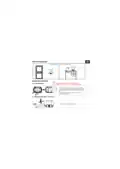
- 2. 1. WHAT'S IN THE BOX (2. PRODUCT DIAGRAM → Child-lock → Frost Protection → Connection with Receiver → Outdoor RH)
- 3. 2.2 Receiver
- 4. Utilization: Boiler and electric heating systems
- 5. Amazon Alexa: Yes, compatible
- 6. 4. PRODUCT INSTALLATION Ey
- 7. Central unit placement EN |
- 8. Receiver installation
- 9. CLOSE Boiler Max (Output for Boiler → Electronic)
- 10. Pairing the receiver with the central unit (paired from factory)
- 11. 5. PRODUCT UTILIZATION Ey (Function Steps → Time Temperature)
- 12. Central unit advanced settings (Usually for professional technicians)
- 13. Receiver operating instructions
- 14. Important notes:
- 15. ***Set up router Ey
- 16. distribution network;
- 17. - Wireless mode should be 802.11.b/g/n (WiFi 6 protocol 802.11ax is no
- 18. 1. Go to Home menu on Alexa app.
- 19. 9. GOOGLE HOME INTEGRATION
- 20. 2. Hit the “Add new" button, enter Tellur Smart in the search bar and
- 21. The crossed-out wheeled-bin symbol on your product, battery, literatur
- 23. 1. WHAT'S IN THE BOX (2. DIAGRAMA PRODUSULUI → Timp → Conexiune WiFi)
- 25. Utilizare: Boilere si sisteme electrice de incalzire
- 26. Amazon Alexa: Da, compatibil
- 27.
- 28.
- 29. 1) Eliberati capacul frontal prin !
- 30. Max
- 32.
- 33. CAnd alimentarea este oprit&, apasati "butonul principal” timp de 3 se
- 35. 6. ASOCIERE WIFI FOLOSIND APLICATIA TELLUR SMART APP i
- 36. Acest dispozitiv accepta doar router cu banda de frecventa de 2,4 GHz,
- 37. 4. Activarea modului de asociere pentru unitatea centrala i
- 38.
- 39. 8. INTEGRARE CU AMAZON ALEXA
- 40. 9. INTEGRARE CU GOOGLE HOME
- 41.
- 42.
- 44. 2. DIAGRAMA DE PRODUCTO (Conexién WiFi → Tiempo)
- 46. 3. ESPECIFICACIONES TECNICAS
- 47. Amazon Alexa: Si, compatible
- 48. 4. INSTALACION DEL PRODUCTO
- 49. Colocacion de la unidad central
- 50. la cabeza de un destornillador en la !
- 51. Caldera
- 52. Emparejamiento del receptor con la unidad central (emparejado de fabri
- 53. Funcion Pasos
- 54. Configuracion avanzada de la unidad central
- 56. Notas importantes:
- 57. ***Configurar el enrutador
- 58. 4. Activar el modo de emparejamiento para la unidad central
- 59.
- 60. 1, Acceda al menu principal de la aplicacion Alexa.
- 61. 9. INTEGRACION CON GOOGLE HOME
- 62. 2. Haga clic en “Agregar nuevo"(Add new}, ingrese Tellur Smart en la b
- 63.
- 65. 2. DIAGRAMME DE PRODUIT (Connexion WiFi → Horloge)
- 67. 3. CARACTERISTIQUES TECHNIQUES
- 68. Amazon Alexa: Oui, compatible
- 69. 4. INSTALLATION DU PRODUIT
- 70.
×
TELLUR TLL331431 WiFi Smart Ambient Thermostat TSH02 User Manual
| General | Details |
|---|---|
| Name | TELLUR TLL331431 WiFi Smart Ambient Thermostat TSH02 User Manual |
| Make | Tellur |
| Language | English |
| Filetype | PDF (Download) |
| File size | 8.21 MB |

TELLUR TSH02 WiFi Smart Thermostat User Manual

TELLUR TLL331441 Thermostat Instructions


Commercial Electric HTSA15CWB Smart Thermostat User Guide

Robertshaw 9602 Programmable Thermostat User Manual

Haswill Electronics RC-113M PID Thermostat User Guide

WHITE-RODGERS 1F75H-21PR Programmable Thermostat Owner’s Manual

heatit Z-Temp2 Wireless Thermostat Instruction Manual

Regulus TP18 LCD Electronic Thermostat User Manual

ENGO CONTROLS E10-B Wi-Fi Thermostat User Guide

NT NetX X5N-SM Thermostat Installation Guide

vtech Installing E-Smart W960 Thermostat User Manual

AeoTec Radiator Thermostat ZWA021 User Manual
Table of Contents
- 2. 1. WHAT'S IN THE BOX - 2. PRODUCT DIAGRAM →
- 3. 2.2 Receiver →
- 4. Utilization: Boiler and electric heating systems →
- 5. Amazon Alexa: Yes, compatible →
- 6. 4. PRODUCT INSTALLATION Ey →
- 7. Central unit placement EN | →
- 8. Receiver installation →
- 9. CLOSE Boiler Max - Output for Boiler →
- 10. Pairing the receiver with the central unit (paired from fact... →
- 11. 5. PRODUCT UTILIZATION Ey - Function Steps →
- 12. Central unit advanced settings (Usually for professional tec... →
- 13. Receiver operating instructions →
- 14. Important notes: →
- 15. ***Set up router Ey →
- 16. distribution network; →
- 17. - Wireless mode should be 802.11.b/g/n (WiFi 6 protocol 802.... →
- 18. 1. Go to Home menu on Alexa app. →
- 19. 9. GOOGLE HOME INTEGRATION →
- 20. 2. Hit the “Add new" button, enter Tellur Smart in the searc... →
- 21. The crossed-out wheeled-bin symbol on your product, battery,... →
- 23. 1. WHAT'S IN THE BOX - 2. DIAGRAMA PRODUSULUI →
- 25. Utilizare: Boilere si sisteme electrice de incalzire →
- 26. Amazon Alexa: Da, compatibil →
- 27. Page 27 →
- 28. Page 28 →
- 29. 1) Eliberati capacul frontal prin ! →
- 30. Max →
- 32. Page 32 →
- 33. CAnd alimentarea este oprit&, apasati "butonul principal” ti... →
- 35. 6. ASOCIERE WIFI FOLOSIND APLICATIA TELLUR SMART APP i →
- 36. Acest dispozitiv accepta doar router cu banda de frecventa d... →
- 37. 4. Activarea modului de asociere pentru unitatea centrala i →
- 38. Page 38 →
- 39. 8. INTEGRARE CU AMAZON ALEXA →
- 40. 9. INTEGRARE CU GOOGLE HOME →
- 41. Page 41 →
- 42. Page 42 →
- 44. 2. DIAGRAMA DE PRODUCTO - Conexién WiFi →
- 46. 3. ESPECIFICACIONES TECNICAS →
- 47. Amazon Alexa: Si, compatible →
- 48. 4. INSTALACION DEL PRODUCTO →
- 49. Colocacion de la unidad central →
- 50. la cabeza de un destornillador en la ! →
- 51. Caldera →
- 52. Emparejamiento del receptor con la unidad central (emparejad... →
- 53. Funcion Pasos →
- 54. Configuracion avanzada de la unidad central →
- 56. Notas importantes: →
- 57. ***Configurar el enrutador →
- 58. 4. Activar el modo de emparejamiento para la unidad central →
- 59. Page 59 →
- 60. 1, Acceda al menu principal de la aplicacion Alexa. →
- 61. 9. INTEGRACION CON GOOGLE HOME →
- 62. 2. Haga clic en “Agregar nuevo"(Add new}, ingrese Tellur Sma... →
- 63. Page 63 →
- 65. 2. DIAGRAMME DE PRODUIT - Connexion WiFi →
- 67. 3. CARACTERISTIQUES TECHNIQUES →
- 68. Amazon Alexa: Oui, compatible →
- 69. 4. INSTALLATION DU PRODUIT →
- 70. Page 70 →