
AuVerte SC801 SpiritCatcher Thermostat Owner’s Manual


DATASHEET
SC801 SpiritCatcher Thermostat
Contents
OVERVIEW.................................................................................................................................................................... 2
USER INTERFACE .................................................................................................................................................................... 5
TEMPERATURE SENSOR............................................................................................................................................................ 5
MOTION DETECTOR................................................................................................................................................................ 5
HVAC USER INTERFACE........................................................................................................................................................... 5
RADIO.................................................................................................................................................................................. 5
SOFTWARE............................................................................................................................................................................ 5
DEVICE................................................................................................................................................................................. 6
ENVIRONMENTAL AND PHYSICAL SPECIFICATION........................................................................................................................... 6
ORDERING INFORMATION ........................................................................................................................................................ 6
Version 1.03 4 December, 2023 AuVerte AG Rothusmatt 14, CH-6300 Zug, Switzerland www.AuVerte.com


| General | Details |
|---|---|
| Name | AuVerte SC801 SpiritCatcher Thermostat Owner’s Manual |
| Make | AuVerte |
| Language | English |
| Filetype | PDF (Download) |
| File size | 0.24 MB |
 (1 votes, average: 5.00 out of 5)
 Loading...

AuVerte 003001.C508 Thermostat Installation Guide

AuVerte C501 Thermostat Installation Guide

AuVerte C504 Ondur Elegant Temperature Control Thermostat Installation Guide
AuVerte SC801 SpiritCatcher Thermostat Owner’s Manual Overview
Summary of Contents
- Page 1: Overview Changing battery Commissioning and verification Specifications User interface Temperature sensor Motion detector HVAC user interface Radio Software
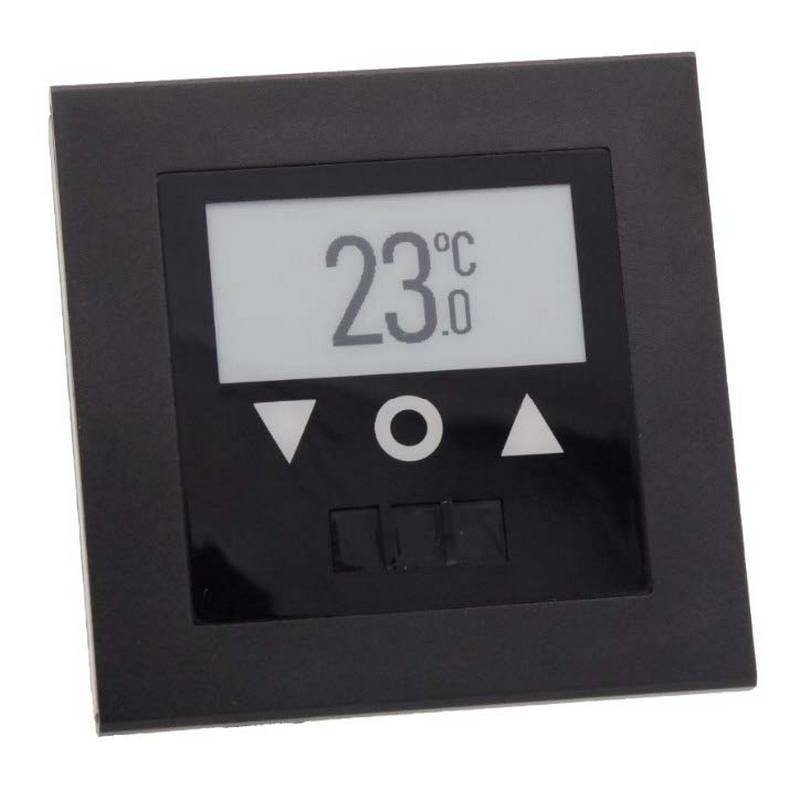
- Page 2: SC801 SpiritCatcher thermostat is part of a modern room automation solution. This thermostat is designed for retrofitability where wiring costs are prohibitive. The SC801 is a battery-powered wireless device that offers a low total cost of ownership. The device can be freely located for optimal accessibility and performance. It is designed to be user-friendly for hotel guests with only three buttons for operation.
- Page 3: SC801 SpiritCatcher Thermostat Changing Battery The CR2450 coin cell battery needs to be inserted as follows: With a small pointy tool, slide open the battery cover of the SC device. Extract the battery with a magnet. Insert the battery with the positive (+) terminal facing the wall. Confirm the startup of the device.
- Page 4: SC801 SpiritCatcher Thermostat Commissioning and verification Follow the steps below to commission and verify the proper operation of an SC801 thermostat. In AvEWB, select the corresponding room where the device is located. Await the transmission of the next device status message that will be displayed in the AvEWB. Review the following fields: Reset/Power date/time Battery voltage Plausible trend signal history Correctly measured room temperature Correct HVAC mode (On/Off, target temperature, fan speed) Correct housing color
- Page 5: SC801 SpiritCatcher Thermostat Specifications User Interface Display: ePaper, 250x128 pixels Radio: IEEE 802.15.4 Keys: Three capacitive touch sensors (up, mode, down) Temperature sensor: 10 °C to 35 °C, accuracy +/- 0.5 °C Software: Firmware OTA Motion Detector: Passive infrared (PIR) sensor HVAC User Interface: Configurable °C / °F Target temperature range: Configurable mode rotation Keypad sensitivity: Configurable (0 – 15)
- Page 6: SC801 SpiritCatcher Thermostat Power: CR2450 3V/620mAh coin-cell (not included) Package content: 3 SC801 Thermostats Frame Material Options: Plastic, Aluminium Color Options: Plastic: Black and White; Aluminium: See color specification Battery life: 5 years Mounting: Surface mount, double-sided adhesive tape Dimensions: 86mm x 86mm x 9mm Operating temperature: 10 °C to 40 °C (50 °F to 104 °F) Environmental light: Keep installed device from direct or strong exposure to sun and illumination devices.
- Page 7: FCC warning This device complies with part 15 of the FCC Rules. Operation is subject to two conditions: it may not cause harmful interference and must accept any interference received. Any changes or modifications not expressly approved could void the user's authority to operate the equipment. This equipment has been tested and found to comply with the limits for a Class B digital device. These limits are designed to provide reasonable protection against harmful interference in a residential installation. The equipment generates and can radiate radio frequency energy, which may cause harmful interference if not used according to instructions. If harmful interference occurs, the user is encouraged to try to correct it by reorienting the receiving antenna or increasing separation between equipment and receiver. Connecting the equipment to a different outlet or consulting an experienced technician may also help. The device has been evaluated to meet general RF exposure requirements. It can be used in portable exposure conditions without restriction.

TELUS ASSORTED Smart Thermostat User Manual

Danfoss Heating Solutions WT-T BasicPlus2 Room Thermostat Installation Guide

Danfoss RET1000 Series Electronic Thermostat User Guide

expert4house BHT-12 Smart Thermostat User Manual

TOUPWELL TP808 WiFi Low Voltage Thermostat User Guide

Honeywell RCH9310 Lyric Round WiFi Thermostat User Guide

Expert4house BAC-1000ALNE Room Thermostat User Guide

BEOK CONTROLS TDS72 Digital Screen Thermostat Instruction Manual

warmup RFT-P Programmable Radiant Floor Thermostat User Manual

Smart Temp SMT-850 Halo Thermostat User Guide