Home > EMMETi > EMMETI U9330000 Zona Smart Thermostat Instruction Manual

EMMETI U9330000 Zona Smart Thermostat Instruction Manual

COMFORTABLE HOMES  
THE SMART WAY  
Operating Instruc
GeneralDetails
NameEMMETI U9330000 Zona Smart Thermostat Instruction Manual
MakeEMMETi
LanguageEnglish
FiletypePDF (Download)
File size0.38 MB
Download PDF
1 Star2 Stars3 Stars4 Stars5 Stars (1 votes, average: 5.00 out of 5)
Loading...

EMMETI U9330000 Zona Smart Thermostat Instruction Manual
Get the free PDF manual for the EMMETI U9330000 Zona Smart Thermostat Instruction Manual and access setup steps, usage instructions, and troubleshooting tips. 👉 View online or download now to keep your thermostat running smoothly!

EMMETI U9330000 Zona Smart Thermostat Instruction Manual Overview

Summary of Contents

  • Page 1: Comfortable homes The smart way Operating instructions
  • Page 2: Getting to know your ZONA thermostat Turning your ZONA ON/OFF Setting the time and date Programming modes To select the programming mode Manual override Locking and unlocking your ZONA Connecting your ZONA to the ZONA app Creating an account by email or phone Advanced settings
  • Page 3: Getting to know your ZONA Thermostat Optimum Geo Location Lock WiFi Cloud Connected Sleep Mode Home Mode Away Mode Turning your ZONA ON/OFF While OFF, your ZONA will not perform any of its functions. Low Temperature Protection (Frost Protection) will also be inactive. Hold for 3 seconds to turn the ZONA on or off. Setting the Time and Date The format for entering the date is YY/MM/DD. Programming Modes 7 Day (07) – This mode allows you to programme all 7 days of the week individually. 5 Day & 2 Day (52) – This mode allows you to programme Monday to Friday, and Saturday to Sunday individually. 24hr (24) – This mode allows you to create a single programme which will repeat on a daily basis.
  • Page 4: To select the programming mode, hold the buttons together for 3 seconds to enter the programming function. Using the buttons, select the required programming mode to confirm your selection. When programming this thermostat, you will be asked to enter a time and then the temperature you require at that time. You can set 4 time/temperature switches through a single day. With these temperature settings, the heating will be increased to 22°C by 07:00 and maintain that temperature until 10:00 when the temperature requirement will switch to 18°C. This last time setting will maintain the specified temperature until 07:00 the next morning. Heat up/cool down varies dependent on building fabric and response times. To enter the programme parameters, hold the buttons together for 3 seconds to enter the programming function. The time display will be flashing – use the buttons to change the hours and press to confirm. Repeat these steps for the remainder of that day, then as necessary depending on your programming mode after that.
  • Page 5: Manual Override allows you to set a temperature higher or lower than the current room temperature by interrupting the current programme. This new temperature will be maintained until the Manual Override is turned off. Locking the ZONA disables all the functions of the buttons and shows the small padlock symbol in the top right of the display. Hold & together for 3 seconds to lock or unlock the ZONA. Advanced Settings allow you to personalize the way your ZONA works. Boost Setting has a target temperature range of 5-35°C. Home Mode has a temperature setting of 5-25°C, default 22°C. Away Mode has a temperature setting of 5-25°C, default 15°C. Sleep Mode has a temperature setting of 5-25°C, default 18°C. High temperature protection is set between 35-90°C, default 90°C. Low temperature protection (frost protection) is set between 0-10°C, default 5°C.
  • Page 6: Connecting your ZONA to the ZONA App Search your App Store for EMMETI ZONA and download Creating an Account by Email, or Phone If you are setting up the App for the first time you will need to register your details. Accept the Privacy Policy to proceed. Enter a valid email address as confirmation is required. A unique code will be sent to your email address which you will then enter on the following screen. After registering you can simply log in with these details, should you log out from the App. Enter the six digit verification code. You can also register by phone by selecting ‘Register by Phone’ in top right corner of the App.
  • Page 7: Once you have created an account, you can create a family on the ZONA app. Click ‘Create family’ to set up your Smart Life. Add family details by selecting ‘Family Name’ and ‘Location’. Once the family is complete, press ‘Done’. To add rooms, click the tick icon. From the main screen, you can view all your added thermostats together or by room. We recommend adding your ZONA manually to begin with. Hold down on your ZONA for 3 seconds to enter ‘WiFi Compatibility’ mode. The WiFi indicator on the thermostat will begin to blink rapidly.
  • Page 8: Once you have created an account, you can connect your ZONA thermostat(s) to the app. The app will pick up your home network, or you can change it if required. It may take a few minutes to connect to your ZONA and complete the pairing. When the thermostat and app have paired, the cloud symbol will appear on the display of the thermostat. Once connected, identify your ZONA, or use one of the labels provided. From here you can control the ZONA you have just added, or return to the welcome menu. To add further ZONA thermostat(s), simply click the ‘+’ and repeat the previous steps.
  • Page 9: Entering the programme parameters on the app involves clicking the settings icon for the desired thermostat. You can change the time and temperature through the 'Weekly Programme Setting'. To alter the default setting, click the desired time period, such as 'Get Up'. Set the start time for the heating, for example, 7am, and click 'Done' to confirm. Click 'Temperature' to set the required temperature, like 22°C, and click 'Done' to confirm. To confirm time and temperature changes, click 'Done' at the bottom of the screen.
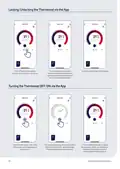
  • Page 10: Locking/Unlocking the thermostat via the app allows you to secure the settings. Click the thermostat you wish to lock or unlock. A lock symbol will appear on both the app and the thermostat when locked. To unlock, simply reverse the procedure. Turning the thermostat off/on via the app is done by clicking the power button. The temperature display will show as dashed lines and the word 'OFF' when the thermostat is off. To turn the thermostat back on, repeat the procedure. Low temperature protection will be inactive while the thermostat is off. ZONA operating instructions provide guidance on using the thermostat.
  • Page 11: Advanced modes Your ZONA thermostat can be set on 6 different modes. AUTO will return you to your current programme. SLEEP is the standard night set back temperature. HOME is used as an override to the current setting. AWAY maintains a setback temperature if you are away for a short time. HOLIDAY sets a specific temperature for the heating while you are away for a prolonged time. BOOST overrides the temperature on the thermostat for a specific amount of time.
  • Page 12: Wiring diagram Remote sensor (optional) Volt free switch Normally open direct contact Normally closed direct contact Live & neutral Terminal connections Spare - do not use ZONA operating instructions
  • Page 13: Page 13